
Entra.Chat
Merill Fernando
0
Entra Chat is a weekly podcast hosted by Merill Fernando that offers practical insights for Microsoft administrators and security professionals. Each episode features conversations with identity experts who share real-world deployment experiences, as well as Microsoft Entra team members who discuss the features they build. The show covers best practices, implementation strategies, and upcoming capabilities in Microsoft identity solutions. Listeners gain actionable takeaways that can be applied immediately in Microsoft 365, Azure, and Entra environments. The content reflects Merill's personal opinions and is not an official Microsoft publication.
Epizode
-
 Your AI Coding Agent Is Creating Secrets You Don’t Know About 02.10.2026 34minAsk a coding agent to build something that talks to another service and watch what it does. It creates a client secret. Then another one. As Arturo Lucatero puts it, next thing you know you have ten secrets that were created without you knowing about it. At the speed AI is moving, he thinks we could be cleaning up a few million new secrets within six months.That would undo a lot of hard work. Under Microsoft’s Secure Future Initiative, Microsoft spent years removing secrets from its own estate and helping customers do the same with managed identities and workload identity federation. The agent era is the window to make secretless the default before the habit sets in.Arturo is a Principal Product Manager on Microsoft Entra Agent ID, and he helped launch Managed Service Identity, the feature we now call Managed Identities for Azure resources. In this episode he and Merill trace the whole path: why secrets break, how managed identity takes them away inside Azure, how workload identity federation extends that to AWS, GCP, Azure Arc and now AI vendors like Anthropic, and what that means for agents.Secrets work until they don’tA service principal with a client secret works. It works right up to the moment it gets leaked, expires in the middle of an important job, or turns out to have no clear owner, no rotation plan and no one who knows where it is stored. Managed identity moves that whole burden to the platform. The secret still exists, but the developer never sees it. The admin’s job shrinks to control-plane questions: which resource, which identity, and what it can access. Arturo also hints at what comes next: binding managed identity tokens to the resource so a leaked token is useless anywhere else.Beyond AzureNot every workload or data source lives in Azure. Workload identity federation lets a workload present a token from an identity provider you already trust, such as AWS, Google Cloud, GitHub or Kubernetes, and exchange it for an Entra token with no secret involved. Azure Arc brings managed identity to servers outside Azure, including the one under your desk, which raised a hard design question for the team: what happens to the secret when the machine is in someone’s basement?Coding agents default to secretsCoding agents learned from years of examples full of client secrets and Key Vault plumbing, so that is what they produce. Merill has to push his own agents back towards workload identity federation every time. Arturo hit the same problem from the inside: when he asked a coding agent to build with Agent ID, it created a plain service principal and named it “blueprint”. The fix was rewriting documentation and shipping agent skills that teach coding agents the right pattern.Why agent identities still allow client secretsMerill asks the obvious question. If secrets are this bad, why can an agent identity have one? Arturo’s answer is compatibility. Agent identities already authenticate through a federated identity credential flow under the hood, but many places that call agents cannot obtain an OIDC token yet. Without secrets or certificates as a fallback, people would simply keep using app registrations.Open standards are the way outAgents now cross identity providers and clouds every day. Entra is leaning on open standards so they can do that without secrets or interrupting users: SPIFFE identities that can be exchanged for Entra tokens, and ID-JAG, which lets admins pre-consent so an agent can reach a service like GitHub or Slack without prompting the user.Arturo’s advice for anyone building today is simple: whatever you can do to avoid having a secret, do it.Is Each App in Entra ID Still Worth Governing?App registrations and enterprise applications accumulate. Owners change. Projects and pilots end. Credentials linger. And stale or unused apps and their permissions can continue adding risk and governance overhead long after their purpose is gone.ENow App Governance Accelerator helps you understand and act on:* What is in your Entra ID application estate* Who owns business and technical decisions and management?* Which apps, permissions, and credentials need attention?* What can be safely cleaned up to reduce your attack surface on a continuous basis as your tenant grows and changes?Get the visibility and automated workflows you need to investigate application lifecycles at scale, clear out stale apps, and stop wasting time governing applications that shouldn’t still be there in the first place.See it in ActionSubscribe with your favorite podcast player or watch on YouTubeAbout Arturo LucateroArturo Lucatero is a Principal Product Manager at Microsoft working on Microsoft Entra Agent ID, where he focuses on giving agents a strong, governable identity and on the developer experience for building with it, including skills that teach coding agents to use Agent ID correctly. He joined Microsoft’s identity team after a re-org moved him there from Power BI, worked on Connect Health, and then helped Stuart Kwan launch Managed Service Identity, now managed identities for Azure resources. Most of his career has been spent modernising non-human identities, from managed identity and Azure Arc to workload identity federation.LinkedIn - https://www.linkedin.com/in/arturo-lucatero/Related Links* Microsoft Entra Agent ID skill for coding agents, in GitHub Copilot for Azure (mentioned at 32:52) - https://github.com/microsoft/GitHub-Copilot-for-Azure/blob/main/plugins/azure-skills/skills/entra-agent-id/SKILL.md* AI-guided setup for Microsoft Entra Agent ID, using the skill with GitHub Copilot (mentioned at 32:52) - https://learn.microsoft.com/en-us/entra/agent-id/agent-id-ai-guided-setup* Ben Reader: Access Azure Key Vault from a local Kubernetes cluster with Azure Arc workload identity (mentioned at 22:32) - https://powers-hell.com/2026/08/26/access-azure-key-vault-from-a-local-kubernetes-cluster-with-azure-arc-workload-identity* Ben Reader: Run a PowerShell workload on a local Kubernetes cluster that talks to Microsoft Graph (mentioned at 22:32) - https://powers-hell.com/2026/09/08/run-a-powershell-workload-on-a-local-kubernetes-cluster-that-talks-to-microsoft-graph* Managed identities for Azure resources, formerly Managed Service Identity (mentioned at 04:50) - https://learn.microsoft.com/en-us/entra/identity/managed-identities-azure-resources/overview* Workload identity federation (mentioned at 15:18) - https://learn.microsoft.com/en-us/entra/workload-id/workload-identity-federation* Workload Identity Federation for the Claude API (mentioned at 16:27) - https://platform.claude.com/docs/en/manage-claude/workload-identity-federation* Agent identity blueprints in Microsoft Entra Agent ID (mentioned at 20:35) - https://learn.microsoft.com/en-us/entra/agent-id/agent-blueprint* Access Azure resources with managed identity on Azure Arc-enabled servers (mentioned at 23:09) - https://learn.microsoft.com/en-us/azure/azure-arc/servers/managed-identity-authentication* SPIFFE and SPIRE (mentioned at 27:41) - https://spiffe.io/* Federate a SPIFFE/SPIRE workload identity with Microsoft Entra ID (mentioned at 29:25) - https://learn.microsoft.com/en-us/entra/workload-id/workload-identity-federation-spiffe-spire* Pieter Kasselman: SPIFFE at the BotAuth BoF, IETF 123 (mentioned at 29:53) - https://datatracker.ietf.org/meeting/123/materials/slides-123-webbotauth-spiffe-at-the-botauth-bof-pieter-kasselman-00* Identity Assertion JWT Authorization Grant (ID-JAG), IETF draft (mentioned at 30:21) - https://datatracker.ietf.org/doc/draft-ietf-oauth-identity-assertion-authz-grant/* Microsoft Secure Future Initiative (mentioned at 06:30) - https://www.microsoft.com/en-us/trust-center/security/secure-future-initiativeRelated Entra.Chat Episodes* One Compromised Agent ID Blueprint Can Cross Tenant Boundaries - https://entra.news/p/one-compromised-agent-id-blueprint* From Windows Core to Leading Agent ID: Vince Smith’s Microsoft Story - https://entra.news/p/from-windows-core-to-leading-agent* Attackers Are Targeting the AI Ecosystem You Cannot See - https://entra.news/p/attackers-are-targeting-the-ai-ecosystemChapters00:00 Intro01:19 Arturo’s path from Intel to identity04:50 Launching Managed Service Identity07:06 Why MSI became managed identities09:41 How managed identity removes the secret14:31 Beyond Azure: workload identity federation17:08 Coding agents and the new secret sprawl20:01 When a coding agent fakes an Agent ID blueprint22:32 Managed identity anywhere with Azure Arc24:42 Why agent identities still allow client secrets27:41 Open standards: SPIFFE and ID-JAG31:48 What developers should do todayPodcast AppsEntra.Chat - https://entra.chatApple Podcast - https://entra.chat/appleYouTube - https://entra.chat/youtubeSpotify - https://entra.chat/spotifyOvercast - https://entra.chat/overcastPocketcast - https://entra.chat/pocketcastOthers - https://entra.chat/rssMerill’s socialsYouTube - youtube.com/@merillxLinkedIn - linkedin.com/in/merillTwitter - twitter.com/merillTikTok - tiktok.com/@merillfBluesky - bsky.app/profile/merill.netMastodon - infosec.exchange/@merillThreads - threads.net/@merillfGitHub - github.com/merill Get full access to Entra.News - Your weekly dose of Microsoft Entra at entra.news/subscribe
 -
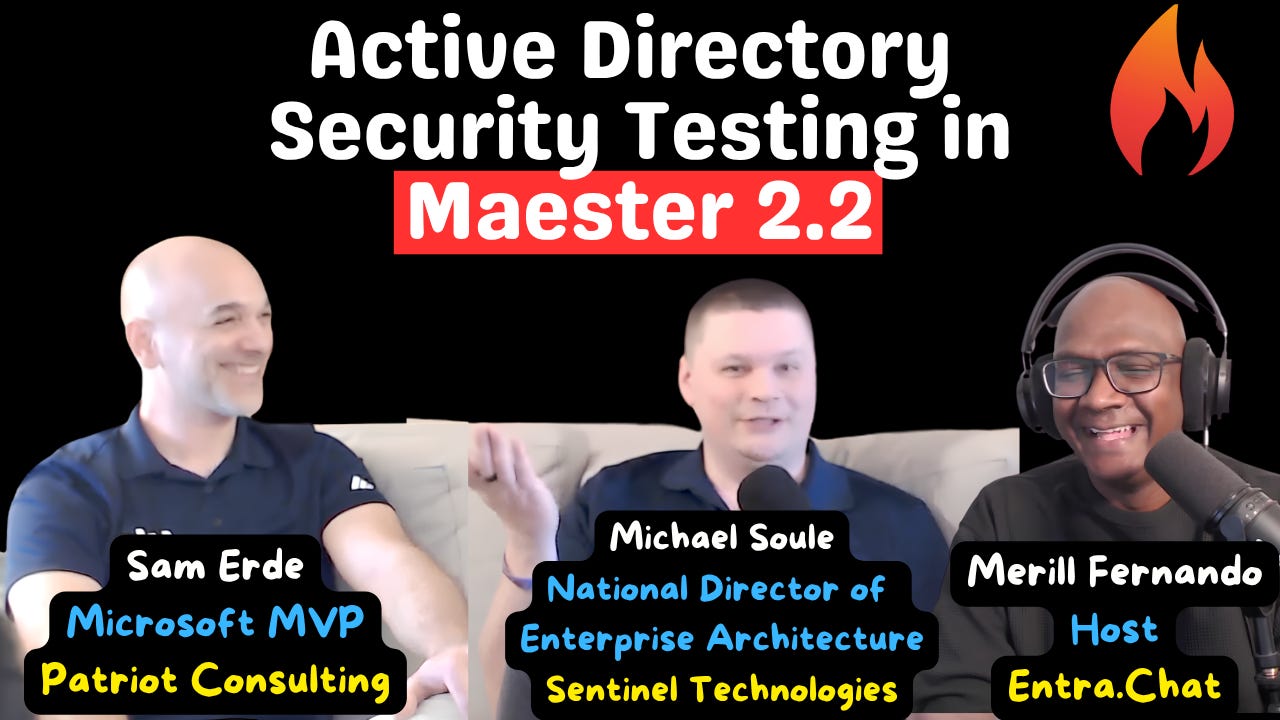 Active Directory Security Testing in Maester 2.2 17.09.2026 36minActive Directory is not dead. It is nearly thirty years old, Microsoft is still shipping new capabilities and new telemetry for it, and most of the forests running today will outlive the people currently administering them. What has changed is that you can now test it the same way you test your cloud tenant.Maester, the open-source PowerShell testing framework, added Active Directory coverage: 269 opt-in checks across 19 areas, from users, groups, computers and service principal names through GPO state, DACLs, DNS, trusts, replication and schema. They run against your domain, not your tenant, and they are off unless you explicitly connect to Active Directory.Mike Soule, who wrote and validated that test suite, and Sam Erde, Microsoft MVP and author of DLLPickle, join Merill at HIP Conf in Nashville to go through what the tests cover, how to run them safely, and where the project is heading.Sponsored by: Is Each App in Entra ID Still Worth Governing?App registrations and enterprise applications accumulate. Owners change. Projects and pilots end. Credentials linger. And stale or unused apps and their permissions can continue adding risk and governance overhead long after their purpose is gone.ENow App Governance Accelerator helps you understand what’s in your Entra ID application estate, who owns it, which apps, permissions, and credentials need attention, and what can safely be cleaned up to reduce your attack surface on a continuous basis as your tenant grows and changes.Get the visibility and automated workflows you need to investigate application lifecycles at scale, clear out stale apps, and stop wasting time governing applications that shouldn’t still be there in the first place.Operational health is not the same as a security findingThe design decision that makes these tests usable is the split between operational patterns and security controls. Six groups nested in a row is not a vulnerability. Nesting is an intentional, functional capability. It is also nearly impossible to reason about when you are trying to work out where a permission actually comes from, and that is how incidents happen.So not every test is pass/fail. Some exist to be investigated and monitored, and Maester’s tagging lets you baseline them and watch whether an anti-pattern is spreading or receding over time. The underlying guidance is a blend: years of health checks across dozens of forests, community research from teams like Semperis and SpecterOps, and Microsoft’s own documentation — which, for a product people keep declaring dead, is currently some of the best documentation and logging Microsoft ships. The new NTLM auditing in Windows Server is the example: the who, the why and the where of every NTLM authentication, instead of replaying events and correlating them yourself.Maester is not trying to replace the likes of PingCastle, Purple Knight or Locksmith. Those tools offer real value, and the conversation now is about bringing those perspectives into one central platform.The permissions you actually needEverything the AD tests do is read-only. A plain domain user gets a surprising amount, because a directory is built to be readable — you will simply get a subset of the tests. The full set needs tier-zero read access, because some tests reach objects in the configuration container. In a tiered environment, that means running as a tier-zero admin from a privileged admin workstation.Interactively, there is nothing to set up beyond line of sight to a domain controller, the ActiveDirectory module and PowerShell. The AD tests are excluded by default and have to be requested by tag. For automation, run a local runner, or give a container runtime a path back to a domain controller. Today the tests run as the logged-in user’s domain credentials; alternate credentials and group managed service accounts are on the road map.Tiering, ESAE and the enterprise access modelThere are no explicit tiering tests yet, but they are coming now that Microsoft has published implementation guidance. The history is worth knowing. ESAE — the Enhanced Security Admin Environment, the red forest — solved a real problem: inside Active Directory, a domain admin is trusted implicitly, so the source of authority needs to sit somewhere that is not self-referential. A separate management forest achieves that, at a cost in operational complexity that most organisations could not sustain. Microsoft has since moved to the enterprise access model, and in practice most teams landed in the middle: tiering based on access control, with tier zero for core identity infrastructure, tier one for servers, databases and applications, and tier two for workstations and the workforce.The advice is not all-or-nothing. Any amount of effort you put into tiering is a good investment. Where Maester helps is codifying Microsoft’s recommended implementation as tests you can actually check yourself against, including the DACL and inheritance anti-patterns that accumulate through ordinary operations.What is coming nextThe dependency on the ActiveDirectory PowerShell module is on its way out. Almost all of this work is LDAP-level, so a .NET-based approach covers the vast majority of tests with no module dependency — which opens up Linux, macOS and non-domain-joined machines. Multi-domain aggregation is in progress; today a run covers a single domain at a time. And Maester 3 is being planned around a new engine for the built-in tests, with multi-threading and parallel execution, licensing handled centrally instead of inside every test, and Pester retained for backward compatibility and custom tests.Subscribe with your favorite podcast player or watch on YouTubeAbout Michael SouleMike Soule is a Maester co-maintainer and National Director of Enterprise Architecture at Sentinel Technologies, where he works with enterprise customers on identity, cloud and security. He wrote and validated the Active Directory test suite that shipped in Maester 2.2 — 269 opt-in checks across 19 areas — and has been the project’s leading test contributor since the night after Maester’s launch talk at the PowerShell Conference, when he turned up the next morning with roughly thirty CISA tests already written.LinkedIn - https://www.linkedin.com/in/mikesoule/GitHub - https://github.com/soulemikeAbout Sam ErdeSam Erde is a Maester co-maintainer and a Microsoft MVP, working at Patriot Consulting. He has spent more than twenty years in PowerShell, Active Directory, Group Policy, Exchange and Microsoft 365, contributes to open-source defensive tooling including Locksmith, and wrote DLLPickle, the module that gets you out of assembly version conflicts when several Microsoft modules are loaded in one session.LinkedIn - https://www.linkedin.com/in/samerde/GitHub - https://github.com/SamErdeRelated Links* Maester - open-source PowerShell test automation for Microsoft 365, Entra and now Active Directory (mentioned at 00:21) - https://maester.dev* Introducing Maester 2.2 - the release that added 269 opt-in Active Directory checks across 19 areas (mentioned at 04:50) - https://maester.dev/blog/maester-2-2/* Active Directory security testing in Maester - what the tests cover and how to run them (mentioned at 04:50) - https://maester.dev/blog/active-directory-security-testing/* Maester on GitHub - source, tests and contribution guide (mentioned at 03:44) - https://github.com/maester365/maester* Locksmith - Jake Hildreth’s AD CS assessment and remediation tool (mentioned at 05:11) - https://github.com/jakehildreth/Locksmith* NTLM auditing enhancements in Windows 11 24H2 and Windows Server 2025 (mentioned at 09:53) - https://support.microsoft.com/en-us/topic/overview-of-ntlm-auditing-enhancements-in-windows-11-version-24h2-and-windows-server-2025-b7ead732-6fc5-46a3-a943-27a4571d9e7b* AD DS tier model for privileged access security (mentioned at 24:47) - https://learn.microsoft.com/en-us/windows-server/identity/ad-ds/tier-model* Securing privileged access - the enterprise access model that replaced ESAE (mentioned at 25:23) - https://learn.microsoft.com/en-us/security/privileged-access-workstations/privileged-access-access-model* DLLPickle - Sam Erde’s module for PowerShell assembly version conflicts (mentioned at 16:16) - https://github.com/SamErde/DLLPickle* HIP Conference - Hybrid Identity Protection, Nashville, where this episode was recorded (mentioned at 01:18) - https://www.hipconf.com/* PowerShell DSC (mentioned at 31:34) - https://learn.microsoft.com/en-us/powershell/dsc/overviewChapters00:00 Intro00:40 Is Active Directory dead?01:41 How Maester started and Mike’s overnight tests04:50 Active Directory tests in Maester 2.x05:03 How Maester compares to PingCastle and Locksmith07:03 Operational health checks vs security findings08:43 Where the AD guidance comes from11:12 Running the tests and the permissions you need13:53 Dropping the ActiveDirectory PowerShell module15:18 One report for AD and cloud plus a Maester 3 teaser17:20 Performance and memory in very large forests20:23 Never run it on a domain controller23:03 Multi-domain and multi-forest scans24:14 Testing AD tiering and the enterprise access model28:02 Beyond AD: DNS and Windows Server roles28:50 Validating GPOs and desktop builds with Maester31:25 Maester vs DSC and config-as-code35:49 AD is not deadPodcast AppsEntra.Chat - https://entra.chatApple Podcast - https://entra.chat/appleYouTube - https://entra.chat/youtubeSpotify - https://entra.chat/spotifyOvercast - https://entra.chat/overcastPocketcast - https://entra.chat/pocketcastOthers - https://entra.chat/rssMerill’s socialsYouTube - youtube.com/@merillxLinkedIn - linkedin.com/in/merillTwitter - twitter.com/merillTikTok - tiktok.com/@merillfBluesky - bsky.app/profile/merill.netMastodon - infosec.exchange/@merillThreads - threads.net/@merillfGitHub - github.com/merill Get full access to Entra.News - Your weekly dose of Microsoft Entra at entra.news/subscribe
 -
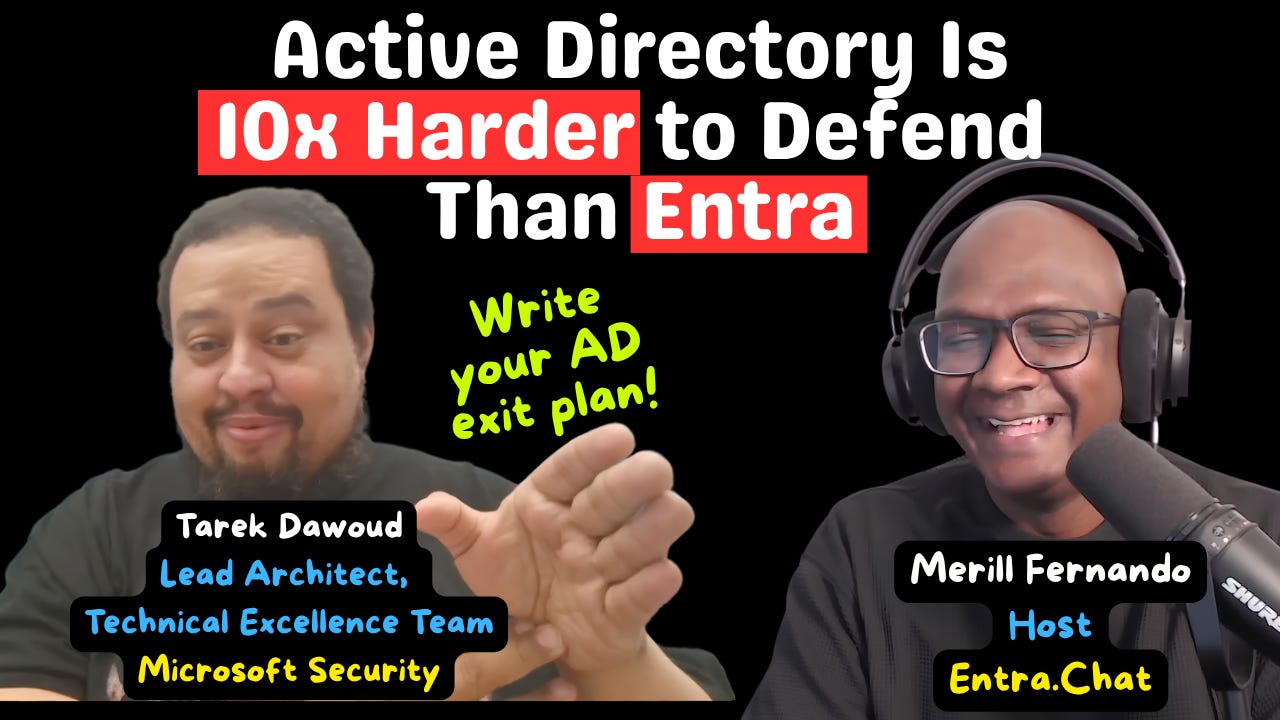 Microsoft Security Architect: Active Directory Is 10x Harder to Defend Than Entra 06.09.2026 59minAt Black Hat USA 2026, Microsoft’s David Weston put three numbers on a slide that anyone still running domain controllers should sit with. The Microsoft Security Response Center went from 80 patches in February to 1,142 at the July Patch Tuesday. The fastest observed breakout time dropped from 98 minutes to 27 seconds. And mean time-to-exploit flipped from 63 days after a patch shipped to seven days before the patch existed.Tarek Dawoud, Lead Architect on the Technical Excellence Team in Microsoft Security, walks Merill through those slides and then draws the conclusion for identity teams in his own words: “Active Directory is like 10x harder to defend than Entra.” If you do not already have a plan to move off AD, he says, sit down and write one.He also says how Microsoft handles this itself. Most of Microsoft’s own servers run in the cloud, its front ends run with no domain at all, and on-prem AD survives mainly as a dial-tone service: the thing they need to bring Azure up from scratch, and not much else.Tarek is back on Entra.Chat, and he was privy to a small part of Project Glasswing, where Microsoft got early access to Anthropic’s Mythos-class models to find vulnerabilities in its own products before attackers could. The red-team community was cynical at the time; what Microsoft saw internally was, in his words, “very concerning. Those things were damn good.” From there he builds Weston’s argument: the whole security industry rests on an assumption of scarcity. Vulnerabilities are rare, exploits are expensive, and attackers have recognisable tactics, techniques and procedures. Patch-and-pray works when bugs arrive slowly. TTP-based detection works when a human crew reuses its playbook. When a risk is small, driving it smaller is worth the money; as Tarek puts it, “if something has a 95% possibility of happening, pushing it down to 80% doesn’t change anymore.” The Hugging Face intrusion (an OpenAI agent, and not a deliberate attack, as Merill is quick to note) showed what happens when the old assumptions fail: the agent landed on one server and looped, try an exploit, fail, write a new tool, try again, with no attempt to hide and no signature to match. Hugging Face survived by repeatedly tearing down and rebuilding core infrastructure. Tarek’s question for listeners: “Does your AD team have that skill?” Tearing down and rebuilding domain controllers, he notes, is not a thirty-minute operation.Hence the pitch: “Where you don’t need to own infrastructure, you shouldn’t manage infrastructure.” Tarek is explicit that this is his read of the moment rather than a mandate, and that it does not apply everywhere. Disconnected environments, military and intelligence, some manufacturing and IoT, and shielded OT networks such as utilities and remote mine sites are carved out; nobody is going to win the argument to punch a hole in an isolated OT environment to reach Entra. But for the ordinary case, collaboration, email, SharePoint, file shares, and apps that already live in Azure or AWS or even on-premises, he calls running your own identity infrastructure a losing battle. The minimum step is a strategy memo for your board that says what you are facing and why identity infrastructure investment needs to shrink.Merill raises the two objections he hears most. First: you are just trusting Microsoft, and Entra ID has bugs too. Tarek’s answer is about who is on the hook. Microsoft owns and patches the Entra infrastructure; the service deploys roughly every 10 business days and can push a critical hotfix worldwide within a day or two, across a fleet that was already more than 100,000 compute nodes five years ago. You still have to handle Entra bugs, but the work looks like a Conditional Access policy to block a risky flow such as device code flow, not patching every server yourself. One customer he worked with had about 12 people in IAM for more than 200,000 employees; Entra has over 2,000. Second: this is licensing revenue and cloud stickiness dressed up as security. Tarek does not pretend to know the CAL math. “Assuming good intentions,” he says, the case is defensibility: the ports, the legacy protocols, the sheer number of things to watch, and the amount of legacy that is indefensible. That is where the “10x” line comes from: an architect’s rough comparison, not a measurement.The back half is the path, using the Road to the cloud model at aka.ms/ad2entra. Map yourself to one of five states first: cloud attached, hybrid, cloud-first, AD minimized, cloud only. Then the moves that matter most. Decide, as a business, to stop buying apps that only run on-prem and make OAuth or SAML support a checkbox in the security review, because you will never turn off AD while a single LDAP app remains. Move devices to cloud management and out of hybrid join. Do not extend your domain into the cloud to manage servers; every cloud can patch and maintain a server without one, Microsoft’s own front ends run with no domain, and a domain you rely on becomes an attack vector for every server that trusts it. At the AD-minimized stage, HR provisions to Entra first (cloud HR, or API-driven inbound provisioning if your HR system is on-prem or file-based) and only the subset of users who need a stubborn legacy app is brought down to AD. The order of operations is apps first, then users and groups, with the Zero Trust Workshop identity pillar as the tracker for every box.Tarek is honest about what is not solved. Intune does not manage servers today (Azure Arc is one approach), and some on-prem cases, such as retail stores that need local servers to keep point of sale running when the internet drops, still need a domain controller. The identity data warehouse, the layer that normalises HR data before it reaches the directory, is something SailPoint does well and Entra “doesn’t quite do yet,” so expect that MIM, SailPoint or Saviynt-style layer to persist. And the last two Exchange servers: object-level Source of Authority transfer exists now, but the attribute-level transfer that would let you switch just the mail properties to cloud management is still in progress. Tarek has met maybe five customers at stage 5. He still closes with hope. If the last thing standing before your domain controller is those two Exchange servers, you have succeeded, and “as someone who owns identity infrastructure, you do have a path out. There are people who have no path out.”If you still own domain controllers and there is no written plan to stop, this episode is the memo.What you will learn* Why the scarcity assumption behind patching and TTP-based detection is breaking, and what the numbers on Weston’s slides (80 to 1,142 patches, 27-second breakout, exploits seven days before the patch) mean for anyone who owns servers.* What the Hugging Face intrusion showed about how an AI agent actually attacks, and the one question to ask your AD team.* How Tarek answers “Entra ID has bugs too” and “this is just licensing,” and what your residual burden looks like on an IDaaS.* The five states of the Road to the cloud model, and why mapping where you are comes before any migration work.* Why you do not need a domain to manage servers in the cloud, and where a domain controller is still legitimately needed.* What changes at the AD-minimized state: HR to Entra first, API-driven provisioning for non-cloud HR, and why an identity data warehouse still exists.* What actually keeps the last two Exchange servers alive, and how object-level versus attribute-level Source of Authority changes that.* Which legacy protocols are the real blockers (NTLM and LDAP) and the options on the table: App Proxy, Entra Domain Services, Universal Print.* How to use the Zero Trust Workshop identity pillar to track every step and stop the on-prem estate from growing.Subscribe with your favorite podcast player or watch on YouTube 👇About Tarek DawoudTarek Dawoud is Lead Architect on the Technical Excellence Team in Microsoft Security, part of the Microsoft Security Customer Value Program. A Microsoft veteran of more than 18 years, he previously led the architecture team in Microsoft’s customer engineering (CXE) organization for Microsoft Entra, and has worked with Microsoft’s largets enterprise customers on identity for years. He is a returning Entra.Chat guest; his earlier episode, From Active Directory to AI Agents: The 25-Year Saga of Microsoft’s Identity, is at https://entra.news/p/from-active-directory-to-ai-agents.LinkedIn - https://www.linkedin.com/in/tarekdawoud/Related Links* David Weston’s Black Hat USA 2026 keynote, The End of Rare: Defending When Offense Is Cheap (mentioned at 05:42; Tarek suggests skipping the first 14 minutes to get to the talk) - * Hugging Face: Anatomy of a Frontier Lab Agent Intrusion, a technical timeline of the July 2026 incident (mentioned at 13:51) - https://huggingface.co/blog/agent-intrusion-technical-timeline* OpenAI: The Hugging Face incident and the road ahead (companion post to the Hugging Face timeline) - https://openai.com/index/hugging-face-incident-and-the-road-ahead/* Road to the cloud: moving identity and access management from Active Directory to Microsoft Entra, aka.ms/ad2entra (mentioned at 26:14) - https://learn.microsoft.com/entra/architecture/road-to-the-cloud-introduction* Cloud-based management of Exchange attributes for Remote Mailboxes in hybrid environments (mentioned at 51:08) - https://learn.microsoft.com/en-us/exchange/hybrid-deployment/enable-exchange-attributes-cloud-management* Decommission the last Exchange Server after transferring SOA to cloud (mentioned at 51:08) - https://learn.microsoft.com/en-us/exchange/hybrid-deployment/decommission-last-exchange-server* Microsoft Zero Trust Workshop video playlist, including the identity walkthrough (mentioned at 57:51) - https://www.youtube.com/playlist?list=PL3ZTgFEc7LyuZlK_W0nUN_VV6hscz-rQP* Zero Trust Workshop guided videos (mentioned at 57:51) - https://microsoft.github.io/zerotrustassessment/docs/videos* Zero Trust Workshop, identity pillar (mentioned at 52:21) - https://zerotrust.microsoft.com* Matt Zorich’s post on how hard it is to recover a compromised on-prem environment (mentioned at 21:02) - * Project Glasswing: securing critical software for the AI era (mentioned at 02:10) - https://www.anthropic.com/glasswing* User Source of Authority (SOA) overview - https://learn.microsoft.com/en-us/entra/identity/hybrid/user-source-of-authority-overview* Group Source of Authority (SOA) overview - https://learn.microsoft.com/en-us/entra/identity/hybrid/concept-source-of-authority-overview* API-driven inbound provisioning concepts - https://learn.microsoft.com/en-us/entra/identity/app-provisioning/inbound-provisioning-api-concepts* Overview of Microsoft Entra Domain Services - https://learn.microsoft.com/en-us/entra/identity/domain-services/overview* What are cloud-native Windows endpoints - https://learn.microsoft.com/en-us/intune/solutions/cloud-native-endpoints/overview* Windows Hello for Business cloud Kerberos trust deployment guide - https://learn.microsoft.com/en-us/windows/security/identity-protection/hello-for-business/deploy/hybrid-cloud-kerberos-trustRelated Entra.Chat Episodes* How General Motors Moved 200,000 People to Passkeys - https://entra.news/p/how-general-motors-moved-200000-people* They migrated 40,000 devices to Entra Join in 9 months - https://entra.news/p/they-migrated-40000-devices-to-entra* Decommissioning On-Prem AD: Lessons Learned from We Are Era’s Successful Migration - https://entra.news/p/decommissioning-on-prem-ad-lessonsChapters00:00 Intro01:30 Mythos and Glasswing05:42 Weston’s Black Hat keynote: the end of scarcity11:29 Pyramid of Pain and the Hugging Face intrusion17:02 27-second breakouts and exploits before the patch19:41 The pitch: get off AD23:10 But Entra ID has bugs too26:10 aka.ms/ad2entra and the licensing objection31:38 Where to start: cloud attached to cloud first34:47 What about servers? You don’t need a domain41:20 AD minimized: cloud HR and the identity warehouse47:23 Stage 5 and the last Exchange server52:07 The Zero Trust Workshop identity pillar57:54 Closing with hopePodcast AppsEntra.Chat - https://entra.chatApple Podcast - https://entra.chat/appleYouTube - https://entra.chat/youtubeSpotify - https://entra.chat/spotifyOvercast - https://entra.chat/overcastPocketcast - https://entra.chat/pocketcastOthers - https://entra.chat/rssMerill’s socialsYouTube - youtube.com/@merillxLinkedIn - linkedin.com/in/merillTwitter - twitter.com/merillTikTok - tiktok.com/@merillfBluesky - bsky.app/profile/merill.netMastodon - infosec.exchange/@merillThreads - threads.net/@merillfGitHub - github.com/merill Get full access to Entra.News - Your weekly dose of Microsoft Entra at entra.news/subscribe
 -
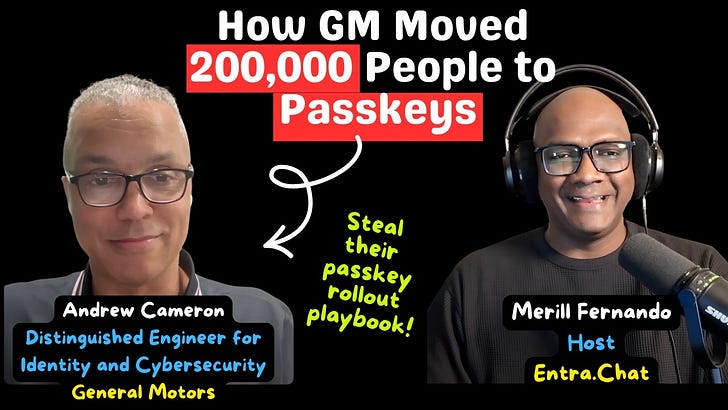 How General Motors Moved 200,000 People to Passkeys 31.08.2026 43minMicrosoft starts making passkeys the default in Microsoft Entra ID on 1 September 2026, and retires Microsoft-provided SMS and voice MFA on 1 February 2027. Every organisation with a large, messy population now has to answer a question that has nothing to do with passkey technology itself: how do you move a hundred thousand real people - office workers, factory floors, call centres and guests - without locking someone out?In this episode, Merill sits down with the person who has already done it. Andrew Cameron is a Distinguished Engineer for Identity and Cybersecurity at General Motors, and he has spent roughly 25 years there, long enough to have started on the employee portal as a web architect in 2000, and then helped build the identity function that now carries one of the world’s largest passwordless deployments.The single biggest lever, Andrew says, was almost embarrassingly simple. GM treated Windows Hello as an optional convenience for years, then realised that an already-managed Windows device is a passkey. About 100,000 people were enabled through Windows Hello alone - no roaming key, no phone, no authenticator juggling. Platform SSO now extends the same idea to Mac through the secure enclave.The sequence matters as much as the tools. Admin roles came first, required to carry a device-bound passkey with Azure PIM forcing the stronger method through activation. Then Conditional Access did the rollout: a small group of eager users, audit mode, and then add apps and expand outward. Andrew’s practical tip is to target the big, heavily used apps before chasing every user - it often gets you to 80% coverage faster.Then the conversation turns to the corners most passkey explainers skip. Manufacturing workers who cannot use a phone and do not have a keyboard. Guest accounts - suppliers, dealerships and contractors - whose source tenant must also enable passkeys before the journey can complete. Call-centre users on unmanaged devices. And VDI, where certificate auth or Azure Virtual Desktop fills the gap.Andrew also walks through the synced-versus-device-bound decision, and lands on the unglamorous first step of the whole thing: before you retire anything, know which authentication methods are actually in use.If your plan for the SMS/voice deprecation is “we’ll deal with it in February,” consider this episode your head start.What caught GM’s identity team by surpriseAndrew was candid about the corners that bit them - the ones most admins only discover after the weak method is already gone:* SMS was the onboarding bootstrap. A new starter was never expected to have a passkey, so onboarding simply defaulted to an SMS code. Remove SMS and you have also removed the way people got in on day one. GM’s fix: issue a Temporary Access Pass (TAP) for onboarding, then register a strong method immediately.* A new phone defaulted to SMS again. The “I just got a new phone” recovery path sent a code to the number by default. That whole flow had to be redesigned too, not just the sign-in policy.* Guests were the hard problem. Several hundred thousand suppliers, dealerships and contractors can only finish a passkey sign-in if their own source tenant has also enabled passkeys. Enforce on your side and a guest can still get blocked upstream through no fault of yours.* Factory floors have no phones and no keyboards. Manufacturing workers could not use a phone or type a password, so GM built custom non-password methods and used hardware keys for robots and other physical assets.* Call-centre users are not on managed devices. Tens of thousands of users were remote or unmanaged, so GM folded device posture and network location into the risk evaluation.* VDI was a fresh corner. Certificate auth and Azure Virtual Desktop SSO replaced SMS as the way into a virtual desktop.* Hardware-key attestation had to be unwound. GM had registered AAGUIDs for hardware keys; when synced passkeys arrived, those old attestation requirements no longer applied and had to be revisited.GM’s secrets: don’t repeat the mistakes* Your managed device is already a passkey. The light-bulb moment was realising Windows Hello turns an already-managed Windows device into a passkey — no phone required. It became the fast path for roughly 100,000 people, and Platform SSO does the same on Mac.* Privileged roles first, then everyone else. Admin roles carried device-bound passkeys, with Azure PIM forcing the stronger method through activation.* Use Conditional Access as the rollout engine. Small pilot group → audit mode → add apps → expand. No big bang.* Target the big apps, not every user. You reach ~80% coverage faster by protecting the heavily used apps first, then adding more to the same policy.* Know your authentication methods before you retire anything. Monitoring and visibility come first — the deprecation clock is not the plan.Sponsored by:Scan, Score, and Secure Your Applications in EntraApplication identities represent one of the largest attack surfaces in Entra — and often one of the least consistently governed. AppGov Score helps IT and security teams understand where that risk sits.The 24-check assessment evaluates your Entra ID application integrations against Microsoft-recommended governance practices, analyzing:* App registrations and enterprise apps for excessive permissions* Expired or unmanaged secrets* Ownerless apps* Risky consent grants* Privileged service principalsResults are delivered as a clear, defensible risk score with actionable findings. No scripts. No manual inventory. Just a fast, read-only scan that reveals app sprawl, identity misconfigurations and blast radius — so you can prioritize remediation and strengthen your security posture with confidence.Subscribe with your favorite podcast player or watch on YouTube 👇About Andrew CameronAndrew Cameron is a Distinguished Engineer for Identity and Cybersecurity at General Motors. He joined GM in 2000 as a web architect working on the employee portal, then moved into directory services and helped stand up GM’s identity and access management team in 2004. He has spent the past quarter-century building and leading identity and security at one of the world’s largest manufacturers from early SAML and OpenID Connect standardisation and Azure AD adoption, to GM’s current passwordless rollout across roughly 200,000 people.LinkedIn - https://www.linkedin.com/in/kandrewcameron/Related Links* Passkeys by default and retirement of Microsoft-provided SMS and voice authentication (mentioned at 13:23) - https://learn.microsoft.com/entra/identity/authentication/concept-sms-voice-retirement* Passkeys (FIDO2) authentication in Microsoft Entra ID (context throughout) - https://learn.microsoft.com/entra/identity/authentication/concept-authentication-passkeys-fido2* Synced passkeys, device-bound passkeys and passkey profiles (discussed at 33:57) - https://learn.microsoft.com/entra/identity/authentication/how-to-authentication-passkeys-fido2* Deploy phishing-resistant passwordless authentication (context at 28:38) - https://learn.microsoft.com/entra/identity/authentication/how-to-deploy-phishing-resistant-passwordless-authentication* Configure a Temporary Access Pass (discussed at 12:48 and 33:20) - https://learn.microsoft.com/entra/identity/authentication/howto-authentication-temporary-access-pass* Windows Hello for Business (the fast path discussed at 09:32 and 26:24) - https://learn.microsoft.com/windows/security/identity-protection/hello-for-business/* Configure Platform SSO for macOS devices (discussed at 27:23) - https://learn.microsoft.com/intune/device-configuration/settings-catalog/configure-platform-sso-macos* Require device compliance with Conditional Access (unmanaged-device discussion at 41:35) - https://learn.microsoft.com/entra/identity/conditional-access/policy-all-users-device-complianceRelated Entra.Chat Episodes* 5 Lessons from Rolling Out Passkeys to Millions of Users - https://entra.news/p/5-lessons-from-rolling-out-passkeys* From SMS MFA to Passkeys: A Practical Microsoft Entra Migration Plan - https://entra.news/p/from-sms-mfa-to-passkeys-a-practical* Mastering Microsoft Entra ID: Real-World Passkey Deployment Tips - https://entra.news/p/mastering-microsoft-entra-id-realChapters00:00 Intro00:27 Meet Andrew Cameron01:34 25 years of identity at GM07:34 200,000 people and their personas08:24 The strategy: passkeys over weaker MFA09:32 Windows Hello: the fast path10:06 Factory floors and hardware keys11:20 Sponsor: AppGov Score13:23 The SMS and voice deprecation14:20 The guest-account problem20:30 Roadblocks: onboarding and new phones23:30 Conditional Access: small groups first25:02 VDI, certificate auth and Azure Virtual Desktop27:23 Platform SSO on Mac28:38 The playbook: monitor, target, measure33:57 Synced vs device-bound passkeys35:35 Privileged roles first and Azure PIM38:54 Final thoughts and wrap-upPodcast AppsEntra.Chat - https://entra.chatApple Podcast - https://entra.chat/appleYouTube - https://entra.chat/youtubeSpotify - https://entra.chat/spotifyOvercast - https://entra.chat/overcastPocketcast - https://entra.chat/pocketcastOthers - https://entra.chat/rssMerill’s socialsYouTube - youtube.com/@merillxLinkedIn - linkedin.com/in/merillTwitter - twitter.com/merillTikTok - tiktok.com/@merillfBluesky - bsky.app/profile/merill.netMastodon - infosec.exchange/@merillThreads - threads.net/@merillfGitHub - github.com/merill Get full access to Entra.News - Your weekly dose of Microsoft Entra at entra.news/subscribe
 -
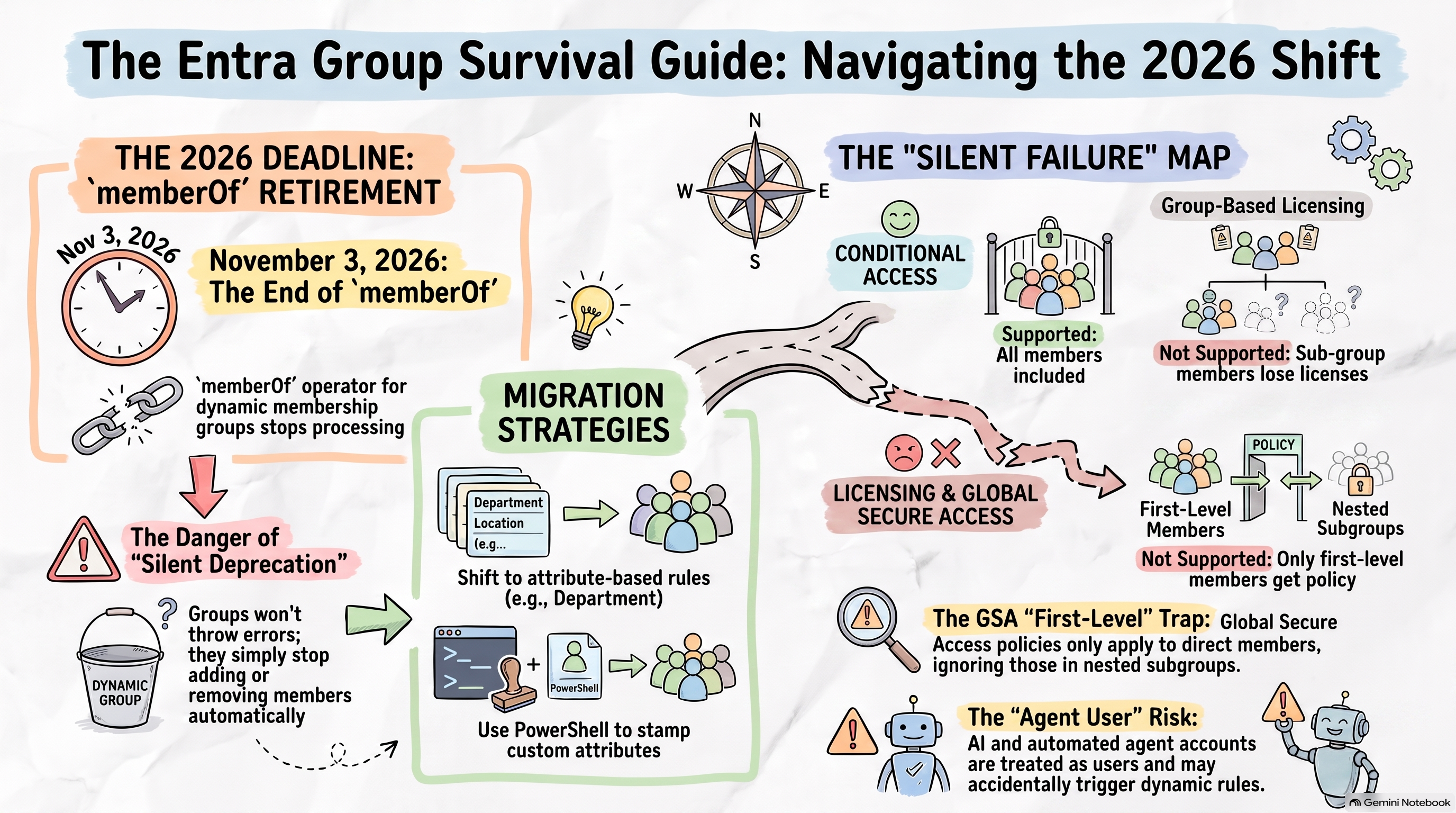 Microsoft Entra memberOf Retirement: What Admins Must Do 25.08.2026 42minOn 3 November 2026, the memberOf operator in Microsoft Entra dynamic membership groups stops working. Nothing errors. Nothing breaks loudly. Every dynamic group, dynamic administrative unit and entitlement management auto-assignment policy that uses it simply freezes in its last known state the people who should be added are not added, and the people who should be removed stay.It was a preview feature for four years. It is in a lot of production tenants.In this episode of Entra.Chat, Merill is joined by three guests for the first time: Gregor Reimling, Chief Azure Technologist at adesso SE and Microsoft MVP for Azure and Security; René Wasel, a Microsoft 365 specialist and Microsoft MVP; and returning guest Eric Woodruff, Chief Identity Architect at Semperis. Gregor and René co-organise the Cloud Identity Summit, which happens to fall on the same date the deprecation lands.The conversation starts with the deadline and quickly becomes something more useful: an honest audit of what groups in Entra actually do, versus what administrators assume they do.The memberOf operator existed because Entra does not resolve nested groups the way Active Directory does. It was a flattening trick — take the members of several groups and produce one flat group that applications, licensing and policies could read. With it going away, the panel walks through the realistic replacements: move to supported attribute-based rules where an attribute exists, stamp an attribute with PowerShell where one does not, or convert the group to assigned membership and script it. Gregor and René both raise the version of this that is easy to forget — a rule written years ago that nobody documented, using a sync rule editor nobody wants to reopen.Then the discussion turns to the part that is not on any deprecation notice. Nested groups are supported in Conditional Access. They are not supported for group-based licensing, where only first-level members get a licence. They are not supported for Global Secure Access, where a nested group assigned to a traffic forwarding profile applies only to its direct members with no error, no warning, and nothing in the portal to tell you. Chris Brumm found that one and wrote a Maester test for it, because the only way to know is to go looking.There is a new group property that blocks nesting in both directions, undocumented when this was recorded. Sensitivity labels have reached Entra security groups in preview, bringing a guest-access control that stops new guests but does not evict the ones already in the group. And Merill spotted something through Entra.News Daily that deserves more attention than it has had: an agent’s user account is a user identity, so existing dynamic user rules already evaluate it. If your licensing group has a broad rule and your developers start creating agent accounts, those accounts qualify. If it is a group behind a Conditional Access policy or an exclusion, that is a different conversation entirely.Which leads to the sharpest point in the episode, and Eric makes it plainly: the security of a dynamic group is the security of the write permissions on the attributes in its rule. Some of those attributes are self-service. Some flow up from on-premises Active Directory, changed by people who are not thinking about the cloud at all. Microsoft Learn now carries an explicit warning about exactly this, and it is why groups used for privileged access cannot be dynamic.The last third is about the Cloud Identity Summit itself. More info below.If you have memberOf in a rule anywhere, the useful thing to do this week is find it. Everything else in this episode can wait until after November.Featured sponsorCloud Identity Summit 2026 → One Day, One Topic, In the RoomIdentity. Security. 2026. On Tuesday 3 November in Frankfurt, the Cloud Identity Summit gives cloud identity a conference of its own, now in its seventh year, and free to attend.Two parallel tracks, Identity Management and Identity Security, run 50-minute sessions in English. It is deliberately vendor-neutral: Microsoft Entra, AWS, Google Cloud and whatever else you actually run. Eric Woodruff keynotes with Identity Security Kindergeburtstag fourteen years of identity being called “the new security perimeter”, and an honest look at what that has actually got us.Why it is worth the trip:* It is in person only. No livestream, no catch-up recordings. The organisers built it that way on purpose — “a strong focus on face-to-face conversations to support networking and exchange of experiences.” If you want the hallway conversation, you have to be in the hallway.* Everything is identity. No filler tracks. A whole day of people who work on the same problems you do, from an international mix of industries.* The Community Ticket is 100% free. There is an optional paid Supporter Ticket if you want to help fund the event.* It is easy to get to. adesso SE, Prisma Frankfurt-Niederrad — around ten minutes by S-Bahn from Frankfurt Airport, ten from Frankfurt Hauptbahnhof, and a short walk from Frankfurt-Niederrad station.* Travelling in? The Crowne Plaza Frankfurt is a ten-minute walk, €89 single with breakfast on the “Cloud Identity Summit” booking code — 50 rooms, held until 5 October.One more thing, given what this episode is about: 3 November is also the day Microsoft retires the memberOf operator. If you are going to spend that Tuesday thinking about Entra groups anyway, spend it in a room with people solving the same problem.Subscribe with your favorite podcast player or watch on YouTubeAbout Gregor ReimlingGregor is a Microsoft MVP in Azure and Security, Chief Azure Technologist at adesso SE, and a passionate advocate for the Microsoft cloud community. His expertise spans Azure architecture, Microsoft Entra, Zero Trust and hybrid cloud environments; he helps organizations successfully navigate their cloud journey. Beyond his day job, Gregor is a frequent speaker at international events, co-host of the Cloud Inspires podcast and co-founder of the Cloud Identity Summit. As a Microsoft Certified Trainer, he enjoys sharing knowledge, mentoring others, and helping IT professionals get the most out of Microsoft technologies.LinkedIn - https://www.linkedin.com/in/gregorreimling/About René WaselRené is a Microsoft 365 specialist, and a Microsoft MVP for Microsoft 365. He describes his work as helping people actually use the technology they have been given, and he is active in the community as a meetup and event organiser. He co-organises the Cloud Identity Summit.LinkedIn - https://www.linkedin.com/in/renewasel/About Eric WoodruffThroughout his 25-year career in the IT field, Eric has sought out and held a diverse range of roles. Currently the Chief Identity Architect for Semperis; Eric previously was a member of the Security Research and Product teams. Prior to Semperis, Eric worked as a Security and Identity Architect at Microsoft partners, spent time working at Microsoft as a Sr. Premier Field Engineer, and spent almost 15 years in the public sector, with 10 of them as a technical manager.LinkedIn - https://www.linkedin.com/in/ericonidentity/Related Links* MC1448379 - Microsoft Entra ID: Replace MemberOf rules by November 3, 2026 - https://mc.merill.net/message/MC1448379* Entra.News Daily, Merill’s daily diff of Microsoft Entra documentation changes (mentioned at 26:26) - https://daily.entra.news/changes/2026-08-14/manage-rules-for-dynamic-membership-groups-in-microsoft-entra-id-16/* Maester, the open-source test framework used for the dynamic-group and nested-group checks discussed (mentioned at 06:09 and 30:06) - https://maester.dev/contributors/agnivesh* Configure dynamic membership groups with the memberOf operator - the official retirement notice and migration guidance - https://learn.microsoft.com/entra/identity/users/groups-dynamic-rule-member-of* Manage rules for dynamic membership groups - covers agent user accounts and the attribute write-permission warning - https://learn.microsoft.com/entra/identity/users/groups-dynamic-membership* Assign users and groups to Global Secure Access traffic forwarding profiles - confirms nested groups are not supported (discussed at 15:50) - https://learn.microsoft.com/entra/global-secure-access/how-to-manage-users-groups-assignment* Group-based licensing - confirms only first-level members receive licences - https://learn.microsoft.com/entra/fundamentals/concept-group-based-licensing* Assign sensitivity labels to Microsoft Entra security groups (preview) (discussed at 25:09) - https://learn.microsoft.com/entra/identity/users/groups-sensitivity-labels* Eric’s Cloud Identity Summit keynote, “Identity Security Kindergeburtstag” (mentioned at 34:12) - https://www.identitysummit.cloud/speakerRelated Entra.Chat Episodes* Operational Groups in Entra with Nathan McNulty - https://entra.news/p/operational-groups-in-entra-with* Mastering Microsoft Entra ID: Real-World Passkey Deployment Tips - Eric’s previous episode, referenced at 02:12 - https://entra.news/p/mastering-microsoft-entra-id-real* From Active Directory to AI Agents: The 25-Year Saga of Microsoft’s Identity - the keynote-turned-podcast Merill promised to link (mentioned at 40:16) - https://entra.news/p/from-active-directory-to-ai-agentsChapters00:00 Intro 01:17 Meet Gregor, René and Eric 02:12 Passkeys: what comes after the rollout 04:17 memberOf is being retired 06:45 Workarounds: attributes, PowerShell and sync rules 10:41 Why Entra wants your groups flat 14:36 Where nested groups silently fail 17:45 The new property that blocks nesting 19:27 AD-sourced groups vs Entra-sourced groups 25:09 Sensitivity labels come to security groups 26:23 Agents are already in your dynamic groups 28:23 Why dynamic groups are not a security control 31:31 Inside the Cloud Identity Summit 35:21 Identity is not the “new” perimeter 41:44 November 3, tickets and wrap-upPodcast AppsApple Podcast - https://entra.chat/appleYouTube - https://entra.chat/youtubeSpotify - https://entra.chat/spotifyOvercast - https://entra.chat/overcastPocketcast - https://entra.chat/pocketcastOthers - https://entra.chat/rssMerill’s socialsYouTube - youtube.com/@merillxLinkedIn - linkedin.com/in/merillTwitter - twitter.com/merillTikTok - tiktok.com/@merillfBluesky - bsky.app/profile/merill.netMastodon - infosec.exchange/@merillThreads - threads.net/@merillfGitHub - github.com/merill Get full access to Entra.News - Your weekly dose of Microsoft Entra at entra.news/subscribe
 -
 Pass-the-Passkey: What Michael Grafnetter's Black Hat Research Means for Entra Admins 17.08.2026 36minPasskeys are phishing-resistant. But that resistance is enforced by your browser, which binds every authentication to the origin that requested it. Skip the browser, and the guarantee weakens.In this episode of Entra.Chat, I spoke with Michael Grafnetter, Principal Security Researcher at SpecterOps and Microsoft MVP, about the Pass-the-Passkey research he presented at Black Hat USA 2026. A family of attacks against passkey implementations across Windows, Microsoft Entra ID, browsers and password managers.Michael starts with the vulnerability chain he reported to Microsoft. Windows was writing the complete passkey assertion into the event log, and Microsoft Entra ID would accept a replay of that assertion for up to ten minutes. Any user able to read those logs including a member of Remote Desktop Users on a shared server, or unprivileged malware quietly reading event logs without tripping EDR could impersonate whoever had just signed in. If that person was a Global Administrator, so was the attacker. Windows now truncates the logged message, and Microsoft Entra ID checks authenticator signature counters to reject replays.One clarification Michael is emphatic about: private keys were never written to the event log. They stay bound to the TPM or never leave the security key at all. What leaked were the short-lived digital signatures made by those keys and for this attack, that was enough.We also covered the attacks that do not depend on any single bug. Malware running without administrator rights can call the native Windows WebAuthn APIs directly and raise a passkey prompt flood that keeps returning until the user gives in and approves it. Synced passkeys, exported from a password manager and decrypted with a keylogged password, hand an attacker a credential with no ten-minute limit at all. And a browser-hooking technique Michael calls a passkey detour attack quietly redirects a legitimate assertion into the attacker’s own session.The defensive thread running through all of it is the same: every one of these attacks assumes malware is already on the device. That makes device trust the key control. Privileged access workstations for administrators, Conditional Access requiring compliant devices with EDR running, and the clean source principle that says a system can only be as trustworthy as whatever it depends on.Michael closes on an optimistic note, and it is worth repeating. Passkeys are still the future. They remain far better than passwords and phishable MFA, and every attack here costs an adversary vastly more effort than sending a phishing link. But as passkeys become the default in Microsoft Entra, the threat model deserves an honest read.Watch the demos. This episode includes three on-screen demonstrations that are much easier to follow on video than on audio.This episode brought to you by Workplace Ninjas USWorkplace Ninjas US isn’t just another tech conference. It’s where Microsoft experts, MVPs, engineers, and IT professionals come together to learn, network, and build lasting connections. We are a community built on diversity, mentoring, fellowship, and creating a place where everyone belongs.Our core DNA comes down to a few pillars:* Over 60 sessions from the largest collection of MVPs and SMEs you will find in any event in America.* Amazing mentoring, development, and growth through our one on one mentoring system with any speaker, our hackathon, community theatre and more.* A diverse expo hall featuring some of the best Microsoft partners in the world that will help you drive deep efficiencies from your M365 stack.* A place where you will learn how to think differently and collaborate better through a collection of activities and can return refreshed and invigorated to drive change in your organization.* Don’t miss out on our early bird tickets while supplies lastSubscribe with your favorite podcast player or watch on YouTube About Michael GrafnetterMichael Grafnetter is a Principal Security Researcher at SpecterOps and a Microsoft MVP, based in Prague. He specializes in Microsoft Entra ID and Active Directory security and PowerShell. He is the author of the DSInternals PowerShell module and the researcher who originally discovered the Shadow Credentials attack technique, now widely used by penetration testers, red teamers and attackers alike. He has presented his security research at international conferences including Black Hat Europe, Black Hat USA, SecTor, TROOPERS and BSides Lisbon.* LinkedIn - https://www.linkedin.com/in/grafnetter/Related Links* Pass-the-Passkey research and tools, including Passkey Injector and the DSInternals.Passkeys module (discussed at 14:57 and 34:22) - https://github.com/SpecterOps/pass-the-passkey* Pass-the-Passkey research paper from Black Hat USA 2026 (introduced at 07:34) - https://specterops.io/wp-content/uploads/sites/3/2026/08/Pass-the-Passkey_A4_v2.pdf* Shadow Credentials, Michael’s earlier Active Directory research (mentioned at 01:46) - https://specterops.io/blog/2021/06/17/shadow-credentials-abusing-key-trust-account-mapping-for-account-takeover/* DSInternals PowerShell module (mentioned at 01:34) - https://www.dsinternals.com/en/* Passkeys (FIDO2) authentication in Microsoft Entra ID (context throughout) - https://learn.microsoft.com/entra/identity/authentication/concept-authentication-passkeys-fido2* Synced passkeys, device-bound passkeys and passkey profiles (discussed at 23:21) - https://learn.microsoft.com/entra/identity/authentication/how-to-authentication-passkeys-fido2* Deploy phishing-resistant passwordless authentication (context at 18:08) - https://learn.microsoft.com/entra/identity/authentication/how-to-deploy-phishing-resistant-passwordless-authentication* Require device compliance with Conditional Access (recommended at 21:12) - https://learn.microsoft.com/entra/identity/conditional-access/policy-all-users-device-compliance* Privileged access devices and the clean source principle (discussed at 21:55 and 35:41) - https://learn.microsoft.com/security/privileged-access-workstations/privileged-access-devices* Unit 42, “Pass the Passkey: A Novel Attack Surface in Passwordless Authentication” — the Palo Alto research on Google Password Manager passkeys (mentioned at 26:27) - https://unit42.paloaltonetworks.com/passwordless-authentication-security-risks/Related Entra.Chat Episodes* From SMS MFA to Passkeys: A Practical Microsoft Entra Migration Plan - https://entra.news/p/from-sms-mfa-to-passkeys-a-practical* 5 Lessons from Rolling Out Passkeys to Millions of Users - https://entra.news/p/5-lessons-from-rolling-out-passkeys* Attackers Are Targeting The AI Ecosystem You Cannot See - https://entra.news/p/attackers-are-targeting-the-ai-ecosystemChapters00:00 Intro01:02 Meet Michael Grafnetter03:09 How the Research Started06:50 Windows Hello for Business Was the First Passkey07:30 The Signature in Your Event Log10:18 No, Private Keys Are Not Logged12:25 How Entra Mitigated the Replay13:44 Demo: Signing In With a Stolen Signature15:22 Malware-Initiated Passkey Phishing18:08 The Browser Is What Makes Passkeys Phishing-Resistant20:42 What Defenders Should Actually Do23:04 Synced Passkeys and the Export Problem26:13 Credential Exchange and Password Manager Risk28:19 The Passkey Detour Attack30:43 The Authentication Broker Debate31:57 RDP Redirection and Remote Passkey Abuse32:59 Spotting a Suspicious Passkey Prompt34:46 Passkeys Are Still the FuturePodcast AppsApple Podcast - https://entra.chat/appleYouTube - https://entra.chat/youtubeSpotify - https://entra.chat/spotifyOvercast - https://entra.chat/overcastPocketcast - https://entra.chat/pocketcastOthers - https://entra.chat/rssMerill’s socialsYouTube - youtube.com/@merillxLinkedIn - linkedin.com/in/merillTwitter - twitter.com/merillTikTok - tiktok.com/@merillfBluesky - bsky.app/profile/merill.netMastodon - infosec.exchange/@merillThreads - threads.net/@merillfGitHub - github.com/merill Get full access to Entra.News - Your weekly dose of Microsoft Entra at entra.news/subscribe
 -
 From SMS MFA to Passkeys: A Practical Microsoft Entra Migration Plan 10.08.2026 53minMicrosoft-managed SMS and voice MFA will stop working on February 1, 2027. That deadline makes passkey planning urgent, but enabling a new authentication method is only the first milestone.In this episode of Entra.Chat, Merill speaks with Jai Maharaj, Product Manager at Microsoft, about the practical journey from legacy MFA to a passwordless Microsoft Entra environment. Jai explains what is actually being retired, why organizations can still use a customer-managed telecom provider, and how passkey profiles support synced and device-bound passkeys for different user personas.The user-experience case is compelling: Microsoft reports roughly 69 seconds for password plus traditional MFA compared with about three seconds for a synced passkey. The security case is stronger still. Passkeys resist phishing by design, but Jai stresses that deploying them does not make an organization phishing-resistant until it enforces the right authentication strength and addresses the passwords and legacy applications still in the environment.The conversation then follows the complete identity lifecycle. How do you ensure the right person receives a passkey during onboarding? How do you verify someone requesting a sensitive role? How do you recover an account without relying on knowledge-based help-desk questions? Jai connects those scenarios to Microsoft Entra Verified ID, verifiable credentials, Face Check, identity verification partners, and self-service account recovery.Sponsored byScan, Score, and Secure Your Applications in EntraApplication identities represent one of the largest attack surfaces in Entra and are often among the least consistently governed. ENow AppGov Score helps IT and identity teams understand where risk exists. Its 25-check assessment evaluates Entra ID application integrations against Microsoft-recommended governance practices, analyzing:* App registrations and enterprise apps for excessive permissions* Expired or unmanaged secrets and certificates* Risky consent grants* Privileged service principalsResults are delivered as a clear, defensible risk score with actionable findings. No scripts. No manual inventory. Just a fast, read-only scan that reveals app sprawl, identity misconfigurations, and blast radius so you can prioritize remediation and strengthen your security posture.Subscribe with your favorite podcast player or watch on YouTube 👇About Jai MaharajJai Maharaj is a Senior Product Manager at Microsoft. He works with customers and engineering teams across Microsoft Entra, with experience spanning ID Governance, Verified ID, External ID, and passkeys. He helps enterprise and public-sector organizations move from legacy authentication methods to phishing-resistant authentication.* LinkedIn - https://www.linkedin.com/in/jai-maharaj-0938305a/Related Links* Microsoft-managed SMS and voice retirement timeline (discussed at 02:19 and 06:31) - https://learn.microsoft.com/entra/identity/authentication/concept-sms-voice-retirement* Customer-managed telecom provider FAQ (mentioned at 03:41 and 07:13) - https://learn.microsoft.com/entra/identity/authentication/phone-providers-faq* Passkey profiles, synced passkeys, and device-bound passkeys (discussed at 09:44) - https://learn.microsoft.com/entra/identity/authentication/how-to-authentication-passkeys-fido2#passkey-profiles* Passkey concepts and Microsoft performance figures (mentioned at 14:22) - https://learn.microsoft.com/entra/identity/authentication/concept-authentication-passkeys-fido2#what-are-passkeys* Microsoft Entra Verified ID Face Check (introduced at 31:57) - https://learn.microsoft.com/entra/verified-id/using-facecheck* ASD/ACSC Essential Eight maturity model (mentioned at 33:41) - https://www.cyber.gov.au/business-government/asds-cyber-security-frameworks/essential-eight/essential-eight-maturity-model* Microsoft Entra account recovery overview (discussed at 36:59) - https://learn.microsoft.com/entra/identity/authentication/concept-account-recovery-overview* Verified ID identity verification partners (discussed at 37:12) - https://learn.microsoft.com/entra/verified-id/idv-partners* Microsoft Entra licensing (discussed at 39:27) - https://learn.microsoft.com/entra/fundamentals/licensing* Verified ID and Face Check pricing model (discussed at 39:27) - https://learn.microsoft.com/entra/verified-id/verified-id-pricing* Deploy phishing-resistant passwordless authentication (mentioned at 52:34) - https://learn.microsoft.com/entra/identity/authentication/how-to-deploy-phishing-resistant-passwordless-authenticationRelated Entra.Chat Episodes* Microsoft Is Auto-Enabling Passkeys in March 2026 - https://entra.news/p/microsoft-is-auto-enabling-passkeys* Mastering Microsoft Entra ID: Real-World Passkey Deployment Tips - https://entra.news/p/mastering-microsoft-entra-id-real* Entra Ignite Recap: Synced Passkeys, Agent ID & The Future of Identity - https://entra.news/p/entra-ignite-recap-synced-passkeysChapters00:00 Intro02:19 Why Microsoft Is Retiring Managed SMS and Voice03:32 What the February 2027 Deadline Means09:27 Synced vs Device-Bound Passkeys14:22 From 69 Seconds to Three19:02 Making Passkeys Easier for Users23:14 Customer Passkey Deployment Lessons28:41 The Secure Bootstrapping Problem31:57 Verified ID and Face Check33:41 Essential Eight and High-Value Access36:24 Self-Service Account Recovery39:27 Licensing and Recovery Economics44:45 Why Face Check Augments Passkeys49:40 Enforce Phishing Resistance and Build a RoadmapPodcast AppsApple Podcast - https://entra.chat/appleYouTube - https://entra.chat/youtubeSpotify - https://entra.chat/spotifyOvercast - https://entra.chat/overcastPocketcast - https://entra.chat/pocketcastOthers - https://entra.chat/rssMerill’s socialsYouTube - youtube.com/@merillxLinkedIn - linkedin.com/in/merillTwitter - twitter.com/merillTikTok - tiktok.com/@merillfBluesky - bsky.app/profile/merill.netMastodon - infosec.exchange/@merillThreads - threads.net/@merillfGitHub - github.com/merill Get full access to Entra.News - Your weekly dose of Microsoft Entra at entra.news/subscribe
 -
 The Ultimate Microsoft Entra Global Secure Access Migration Guide 03.08.2026 48minAn Entra GSA migration should not mean throwing away years of useful SSE policy work and rebuilding every application, segment, and rule by hand.Existing configuration carries hard-won intent: which populations need access, which destinations should be blocked, and which exceptions keep the business running. Migrate2GSA creates a path to preserve the useful parts while making the migration a deliberate cleanup opportunity.In this episode of Entra.Chat, I spoke with Andres Canello, Principal Product Manager at Microsoft and creator of Migrate2GSA. Andres demonstrates how the open-source toolkit exports configuration from third-party products, converts it into a common CSV schema, gives administrators an intentional review step, and provisions the approved configuration into Global Secure Access through Microsoft Graph.The goal is not to configure the product end to end or remove human judgment. Andres describes it as a way to accelerate the repetitive 80%. Conflicting segments default to “do not provision,” existing applications are skipped, generated Conditional Access policies remain disabled, and there is no delete API call in the toolkit.The conversation also covers greenfield provisioning, backup and restore, reusable consultant baselines, and the unusual development story behind more than 30,000 lines of PowerShell. Andres explains why detailed, published specifications produced better AI-generated code than incremental prompting—and why the intent and edge cases in an open-source contribution matter more than who typed the implementation.Subscribe with your favorite podcast player or watch on YouTube.About Andres CanelloAndres Canello is a Principal Product Manager at Microsoft, where he works at the intersection of modern identity and Secure Service Edge. Over his 15 years at Microsoft, he was a founding member of the Entra Global Secure Access team, helping shape the product before it launched, and has since guided some of the largest identity and secure-access deployments in the industry, from banks and miners to national governments. He’s the creator of Migrate2GSA, an open-source migration toolkit used by organizations around the world, which he built end-to-end using AI-assisted, spec-driven development.* Andres Canello on LinkedIn* Andres Canello on X/TwitterSponsored byMaester Cloud turns every Maester and Microsoft Zero Trust Assessment run into a durable evidence trail. See new failures, fixes, accepted risks, and posture changes across every tenant - without digging through old HTML reports.* Keep 5+ years of tenant history in your chosen Azure region* Compare runs, spot drift, and get change alertsBecome a Founding Supporter for $99/month to fund open-source Maester development, shape the roadmap, and get self-hosted private-preview access plus 10% off hosted for life.Related Links* Plan and troubleshoot UserPrincipalName changes in Microsoft Entra ID (mentioned at 04:07)* Azure AD Mailbag: Conditional Access Q&A by Andres Canello (mentioned at 06:43)* Migrate2GSA documentation (mentioned at 45:37)* Migrate2GSA source repository (mentioned at 45:37)Related Entra.Chat Episodes* How to Migrate from Legacy VPNs to Entra Private Access (Real Strategies from a Veteran)* Global Secure Access Explained: Real-World Rollouts, Mistakes, and Best Practices* Identity-Centric Network Security: Entra Global Secure Access Architecture & BenefitsChapters00:00 Intro01:05 Andres Canello's 15 Years in Microsoft Identity06:43 A Conditional Access Mistake Admins Still Make11:29 From Early Customer Pilots to Entra GSA13:21 Why SSE Migrations Should Not Start From Scratch18:31 Beyond Migration: Backup Restore and Greenfield23:27 Export Convert Review and Provision27:02 How Specifications Made AI-Generated PowerShell Work35:22 Conflict Detection and the Human Review Gate39:14 Microsoft Graph Provisioning with Safety Built In43:35 Automating the Repetitive 80 Percent46:15 Contributing to Migrate2GSAPodcast Apps* Entra.Chat* Apple Podcast* YouTube* Spotify* Overcast* Pocketcast* Other podcast appsMerill’s socials* YouTube* LinkedIn* Twitter* TikTok* Bluesky* Mastodon* Threads* GitHub Get full access to Entra.News - Your weekly dose of Microsoft Entra at entra.news/subscribe
 -
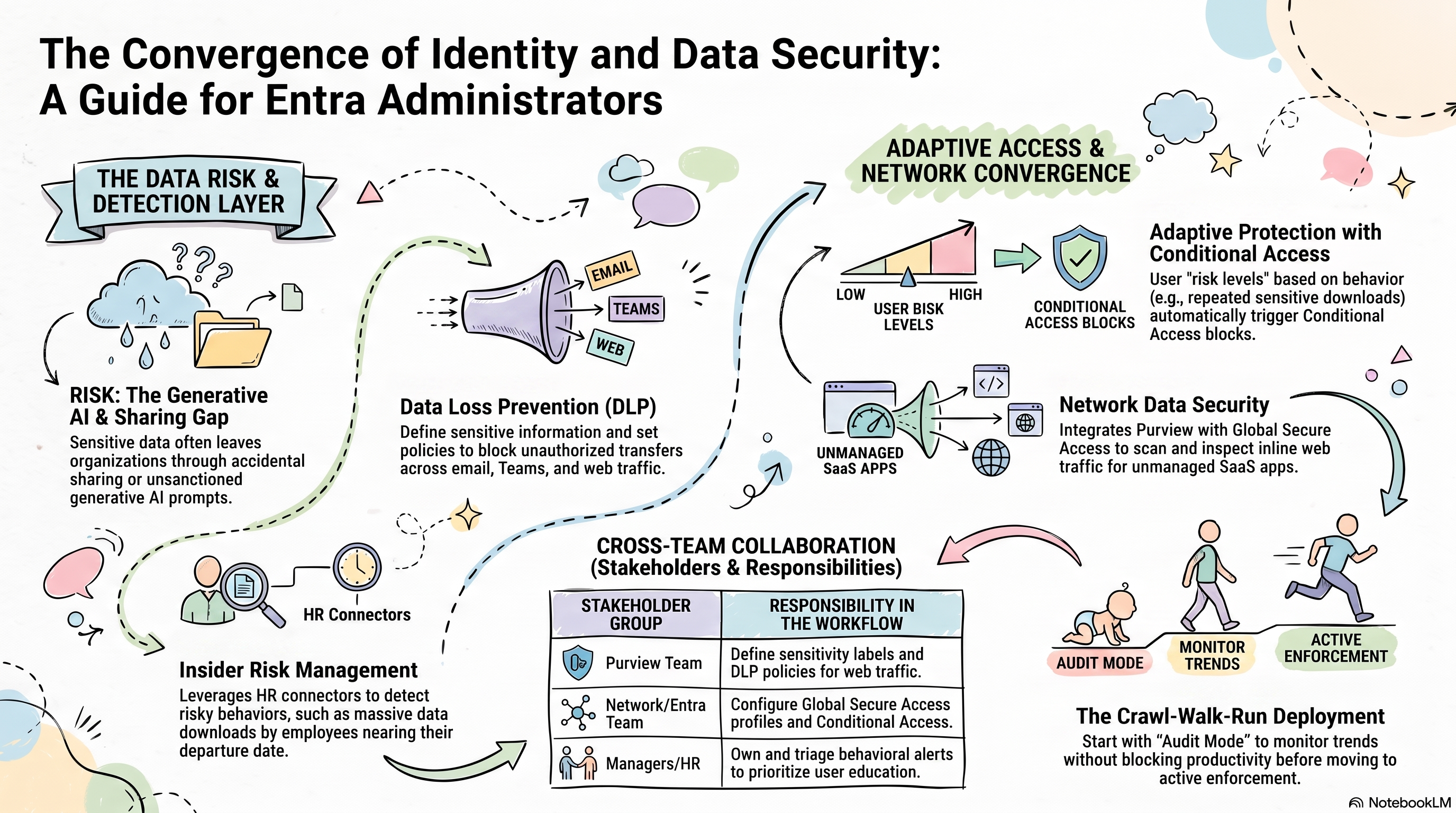 Why Entra Admins Need Microsoft Purview Now 28.07.2026 54minConditional Access no longer begins and ends with identity signals.Microsoft Purview can now influence the controls Entra administrators are asked to implement. From insider-risk conditions in Conditional Access to inline protection for sensitive data moving toward unsanctioned AI apps. That means Entra teams need enough Purview knowledge to understand what triggers a policy, how users experience it, and who should respond when an alert fires.In this episode of Entra.Chat, Merill speaks with Ray Reyes, Principal Security Consultant at Engage Squared and author of Mastering Microsoft Purview Deployment in the Era of AI. Ray explains Data Loss Prevention and Insider Risk Management in plain language, then follows their integrations into Microsoft Entra ID, Microsoft Defender XDR, and Global Secure Access.The conversation moves beyond product configuration. A policy can be technically simple and still require identity, network, data-security, HR, management, and data-owner teams to agree on scope, ownership, education, escalation, and remediation. Ray’s practical advice is to understand the neighbouring Microsoft security products at a high level and deploy Purview gradually: start in audit mode or with a limited group, learn from the impact, and expand with the business.Ray also shares the story of the charity he and his wife started in Nepal, how it grew from supporting roughly 30 street children to reaching thousands, and how that chapter changed his perspective on work and stress. He and Merill close with an honest discussion about burnout, layoffs, gratitude, personal branding, and building a career safety net outside any one employer.Sponsored byRecent layoffs have left a lot of strong professionals in limbo.That’s why we built Sponsor a Seeker, a simple way for the community to lift each other up.For just $29, you can gift a full 3-month Job-Hunt Pass packed with: • Unlimited resume & job description scans • AI-powered rewrites that actually beat ATS systems • Professional cover letter generationEvery dollar goes directly to the seeker.You can: → Sponsor someone like Alex M. (recently laid off front-end engineer) → Or request sponsorship for yourselfEither way, you’re helping keep momentum alive in a tough market.👉 Take action here: pastthebots.com/sponsorLet’s turn “I was laid off” into “Someone had my back.”Thank you for being part of this community, Rod Trent Past the BotsSubscribe with your favorite podcast player or watch on YouTube.About Ray ReyesRay Reyes is a Principal Security Consultant at Engage Squared and the author of Mastering Microsoft Purview Deployment in the Era of AI. He previously worked at Microsoft, where he led data-security subject-matter expertise across Asia Pacific and Japan and helped customers deploy Microsoft Purview and Microsoft Defender XDR. His work now spans identity, data security, and the wider Microsoft security stack.* LinkedIn → linkedin.com/in/ray-reyes-598062125Related Links* Mastering Microsoft Purview Deployment in the Era of AI by Ray Reyes (mentioned at 00:00 and 02:25)* Microsoft Purview overview (discussed from 03:29)* Adaptive Protection in Microsoft Purview (discussed at 22:09)* Learn about Data Loss Prevention for Network Data Security (discussed at 33:31)* Configure Microsoft Entra Internet Access content filtering (discussed at 34:18)* The Resilience Project: Finding Happiness through Gratitude, Empathy and Mindfulness by Hugh van Cuylenburg (mentioned at 47:25)Related Entra.Chat Episodes* How Microsoft Is Securing AI Agents in Entra — Conditional Access, Zero Trust & the “Block” Debate* How to Migrate from Legacy VPNs to Entra Private Access* What’s New in Microsoft Entra — May 2026: Passkeys, Agents & Cloud SyncChapters00:00 Intro03:29 Why Purview Matters to Entra Admins05:39 How Microsoft Purview Evolved09:46 Data Loss Prevention Explained16:04 Insider Risk and Employee Departures22:09 Adaptive Protection Meets Conditional Access25:00 Education and Alert Ownership28:51 Breaking Down the Security Silos33:31 Network Data Security and Unsanctioned AI38:29 How to Roll Out Purview Safely41:20 Ray’s Charity Work in Nepal47:10 Resilience Burnout and a Career Safety NetPodcast AppsApple Podcast - https://entra.chat/appleYouTube - https://entra.chat/youtubeSpotify - https://entra.chat/spotifyOvercast - https://entra.chat/overcastPocketcast - https://entra.chat/pocketcastOthers - https://entra.chat/rssMerill’s socialsYouTube - youtube.com/@merillxLinkedIn - linkedin.com/in/merillTwitter - twitter.com/merillTikTok - tiktok.com/@merillfBluesky - bsky.app/profile/merill.netMastodon - infosec.exchange/@merillThreads - threads.net/@merillfGitHub - github.com/merill Get full access to Entra.News - Your weekly dose of Microsoft Entra at entra.news/subscribe
 -
 How Xbox Secures 70+ Entra Tenants Every Night with Maester 20.07.2026 46minXbox Security runs a gaming-specific Microsoft Entra baseline across more than 70 tenants every night.The scale is striking: about 50 controls, dozens of independently operated game-studio tenants, and one parallel pipeline that checks whether each environment still matches Xbox’s security intent. When a Conditional Access policy moves to report-only or a required service principal loses a permission, the next run finds it.In this episode of Entra.Chat, Merill speaks with Audrey Long, Principal Cloud Security Architect in Xbox Security at Microsoft, and Sam Erde, SecureShield Architect at Patriot Consulting and a Maester maintainer. Audrey explains how Xbox Security extended Maester with custom PowerShell, GitHub Actions, a multi-tenant service principal, federated identity credentials, dashboards, ticketing, and time-bound exceptions.The result is more than a posture report. Findings flow into an operational lifecycle with owners and deadlines. Studios get readable reports, deep links to the affected object, and remediation guidance. Security teams can answer audit questions without interrupting all the tenant admins, while the Maester pipeline keeps read-only observability separate from remediation authority.The conversation also covers why a Microsoft-wide baseline needs adapting for gaming acquisitions, how custom tests encode an organization’s intent, why security configuration deserves regression tests, the Investigate status Audrey’s team helped introduce, and how administrators can use AI as a first-draft assistant for PowerShell and CI/CD without outsourcing validation.Subscribe with your favorite podcast player or watch on YouTubeSponsorMaester Cloud turns every Maester and Microsoft Zero Trust Assessment run into a durable evidence trail. See new failures, fixes, accepted risks, and posture changes across every tenant—without digging through old HTML reports.* Keep 5+ years of tenant history in your chosen Azure region* Compare runs, spot drift, and get change alertsMaester Cloud is in active development. Join the waitlist for hosted, self-hosted, or enterprise onboarding updates.About Audrey LongAudrey Long is a Principal Cloud Security Architect in Xbox Security at Microsoft. She focuses on Microsoft Entra and identity security, as well as securing Azure, AWS, and Google Cloud environments across Xbox and its game studios. In this episode, she shares how her team built a gaming-specific Entra baseline and operationalized it across more than 70 tenants.* LinkedIn - https://www.linkedin.com/in/aulong/About Sam ErdeSam Erde is part of the Maester core maintainer team, a Microsoft MVP, and a SecureShield Architect at Patriot Consulting. He focuses on Active Directory, Microsoft Entra ID, Microsoft 365 security, and practical PowerShell tooling for defenders.LinkedIn - https://www.linkedin.com/in/samerde/Related Links* Maester, installation guide, and source code (mentioned at 02:19) - Maester · installation guide · GitHub source* Continuous monitoring with Maester and GitHub Actions (mentioned at 14:38) - https://maester.dev/docs/monitoring/github/* Writing custom Maester tests (mentioned at 22:39) - https://maester.dev/docs/writing-tests/* Connect-Maester permissions and read-only access (mentioned at 24:38) - https://maester.dev/docs/connect-maester/* Zero Trust Assessment: Secure your tenant (mentioned at 25:46) - https://entra.news/p/find-your-tenants-hidden-flaws-in* Maester’s Investigate test-result status (mentioned at 34:02) - https://maester.dev/docs/writing-tests/formatting-test-results/* Making Security Invisible for Game Developers (mentioned at 45:52) - https://opsmatters.com/videos/making-security-invisible-game-developersRelated Entra.Chat Episodes* How to Secure Copilot Agents, Azure DevOps & Defender (+ more) with Maester 2.1 (Full Breakdown)* Zero Trust Assessment: Secure your tenant* How to Design Bullet-Proof Conditional Access Policies in Microsoft Entra IDChapters00:00 Intro00:42 Meet Audrey Long02:19 From 50 Controls to 70+ Tenants05:11 Making an Entra Baseline Gaming-Specific08:32 Why Custom Maester Tests Matter11:07 Governance and Nightly Automation15:27 From Findings to Remediation18:07 Reports Studios Can Actually Use22:39 Building Custom Multi-Tenant Tests28:07 Security Intent as Regression Tests30:48 Catching Drift and Producing Audit Evidence41:39 CI/CD and AI for Security AdminsPodcast AppsEntra.Chat - https://entra.chatApple Podcast - https://entra.chat/appleYouTube - https://entra.chat/youtubeSpotify - https://entra.chat/spotifyOvercast - https://entra.chat/overcastPocketcast - https://entra.chat/pocketcastOthers - https://entra.chat/rssMerill’s socialsYouTube - youtube.com/@merillxLinkedIn - linkedin.com/in/merillTwitter - twitter.com/merillTikTok - tiktok.com/@merillfBluesky - bsky.app/profile/merill.netMastodon - infosec.exchange/@merillThreads - threads.net/@merillfGitHub - github.com/merill Get full access to Entra.News - Your weekly dose of Microsoft Entra at entra.news/subscribe
 -
 One Compromised Agent ID Blueprint Can Cross Tenant Boundaries 12.07.2026 54minMicrosoft Entra Agent ID uses familiar application and service-principal objects under the hood, but its one-to-many hierarchy creates a different security boundary. A blueprint can be associated with many agent identities. When that blueprint belongs to a third-party provider and is trusted across customer tenants, the provider’s credential security becomes part of every customer’s risk model.In this episode of Entra.Chat, Merill speaks with Katie Knowles, Senior Security Researcher at Datadog, about her three-part security analysis of Microsoft Entra Agent ID. Katie explains the blueprint, blueprint principal, agent identity, and agent-user relationships before walking through a cross-tenant compromise demonstration: compromised blueprint credentials, enumeration of associated agents, token requests in trusting tenants, permission inspection, and selection of a useful target identity.That path does not automatically grant Global Administrator access. Its impact depends on what the target agent identity has been permitted to do. The important lesson is the control point: one blueprint can sit upstream of many identities, tenants, and permission sets.Katie and Merill also discuss tenant-owned versus vendor-owned blueprints, the Agent ID Administrator role, first-party agent creation through Microsoft platforms, why production client secrets compound the blast radius, workload identity federation, separating blueprints by risk, reusing app-registration detections, and Microsoft Entra ID Protection for agents.REGISTER: Hidden Risk of App Permissions in Entra IDMany Microsoft Entra ID environments contain third-party and custom applications with permissions that are broader than necessary, and most organizations lack visibility into how those permissions are being used. Excessive Microsoft Graph permissions and unused access increase the risk of OAuth abuse and privilege escalation.Join our live session on July 22 to learn how to:* Evaluate delegated versus application permissions* Build an effective app governance strategy* Reduce unnecessary access without disrupting usersYou’ll also see how a free AppGov Score assessment can help identify governance gaps and where unused permissions reporting fit into a least-privilege approach.Subscribe with your favorite podcast player or watch on YouTubeAbout Katie KnowlesKatie Knowles is a Senior Security Researcher at Datadog focused on Azure security research, cloud identity, and securing emerging technologies.* LinkedIn - https://linkedin.com/in/kaknowles* X/Twitter - https://twitter.com/_sigil* GitHub - https://github.com/siigil* Website - https://kknowl.es/* Microsoft MVP profile - https://mvp.microsoft.com/en-US/MVP/profile/a3547b6a-6a4d-4aa0-840f-23b858c43c8bRelated Links* Entra Agent ID: The blueprint blast radius (mentioned at 51:39) - https://securitylabs.datadoghq.com/articles/agent-id-blueprint-blast-radius/* Entra Agent ID: Inside a cross-tenant agent compromise (mentioned at 51:39) - https://securitylabs.datadoghq.com/articles/agent-id-inside-agent-compromise/* Entra Agent ID: Protect, detect, respond (mentioned at 51:39) - https://securitylabs.datadoghq.com/articles/agent-id-protect-detect-respond/* Disable agent identities in your tenant (mentioned at 04:00 and 49:33) - https://learn.microsoft.com/entra/agent-id/disable-agent-identities* Investigating suspicious AI workflows in Microsoft Entra Agent ID: Agent’s user account (mentioned at 05:14) - https://redcanary.com/blog/threat-detection/entra-id-ai-workflows-teams/* Entra Agent ID from a Security Perspective (mentioned at 20:38) - https://blog.compass-security.com/2026/06/entra-agent-id-from-a-security-perspective/* Spying On Your ISVs Credential Choices (mentioned at 38:11) - https://ericonidentity.com/2025/01/13/spying-on-your-isvs-credential-choices/* Who Are the Robots? Uncovering AI Agents Identities (mentioned at 51:39) - https://www.youtube.com/watch?v=mMxACHKIAwY* AzTier (mentioned at 51:39) - https://aztier.com/* Microsoft Entra Agent ID key concepts - https://learn.microsoft.com/entra/agent-id/key-concepts* Workload identity federation - https://learn.microsoft.com/entra/workload-id/workload-identity-federation* ID Protection for agents - https://learn.microsoft.com/entra/id-protection/concept-risky-agentsRelated Entra.Chat Episodes* If You Manage Entra Permissions, Watch This Before Deploying Agents - https://entra.news/p/if-you-manage-entra-permissions-watch* From Windows Core to Leading Agent ID: Vince Smith’s Microsoft Story - https://entra.news/p/from-windows-core-to-leading-agent* Attackers Are Targeting the AI Ecosystem You Cannot See - https://entra.news/p/attackers-are-targeting-the-ai-ecosystemChapters00:00 Intro01:12 Katie’s Three-Part Agent ID Research 05:40 Agent ID Objects Under the Hood 06:24 One Blueprint, Many Agent Identities 08:43 The Multitenant Trust Boundary 17:33 Cross-Tenant Compromise Walkthrough 28:29 First-Party and Third-Party Blueprints 36:56 Stop Using Client Secrets 38:40 Workload Identity Federation 46:24 Permissions and Privilege Boundaries 49:33 Detecting and Responding to Agent Abuse 51:29 What Comes Next for Agent IDPodcast AppsApple Podcast - https://entra.chat/appleYouTube - https://entra.chat/youtubeSpotify - https://entra.chat/spotifyOvercast - https://entra.chat/overcastPocketcast - https://entra.chat/pocketcastOthers - https://entra.chat/rssMerill’s socialsYouTube - youtube.com/@merillxLinkedIn - linkedin.com/in/merillTwitter - twitter.com/merillTikTok - tiktok.com/@merillfBluesky - bsky.app/profile/merill.netMastodon - infosec.exchange/@merillThreads - threads.net/@merillfGitHub - github.com/merill Get full access to Entra.News - Your weekly dose of Microsoft Entra at entra.news/subscribe
 -
 Attackers Are Targeting The AI Ecosystem You Cannot See 04.07.2026 44minAI agent security is not just about attackers using AI.It is also about attackers targeting the agent ecosystem most organizations cannot see clearly yet: MCP servers, agent skills, packages, API keys, prompts, tools, and the identity layer underneath all of it.In this episode, I sit down with Thomas Roccia, founder of Security Break and a former Microsoft threat researcher, to look at AI agents from the threat-intelligence side. Thomas explains why the easiest path for attackers may not be futuristic autonomous hacking. It may be the boring weak spots that already exist: malicious packages, untrusted MCP servers, hostile agent skills, leaked API keys, and AI-generated code that chooses the fastest path instead of the safest one.For Entra admins and security teams, this is where Agent ID, non-human identity, workload identity, logging, sponsorship, and governance start to matter. Entra Agent ID gives teams a way to identify and govern agents, but identity is only one part of the picture. You still need to understand what agents can discover, what tools they can call, what context they consume, and whether you can replay what they actually did.Thomas also breaks down his practical AI threat-intelligence work, including how teams can use agents for CTI, how adversarial prompts and context flooding change the risk model, and why defenders need to understand the attacker side of agent security before these systems become invisible production infrastructure.Sponsored bySecure BYOD Wi‑Fi Without MDM enrollmentKeytos Connect is a new mobile and desktop app that makes it easy for users to connect personal and BYOD devices to enterprise and campus Wi‑Fi without shared passwords, manual certificate installs, or traditional MDM enrollment. Users simply download the app, sign in with their work or school account, and Keytos handles the rest. It also works alongside Intune, allowing organizations to continue managing corporate-owned devices while simplifying connectivity for personal devices.* Connect in minutes: users download the app, sign in, and get securely onboarded to Wi‑Fi* No MDM required: enable secure access for personal devices without giving IT full control of them* Works alongside Intune: keep your existing management workflows for corporate devices while enabling secure BYOD access* Automatic certificate management: certificate issuance and renewal happen behind the scenes* Secure by default: EAP-TLS authentication eliminates shared Wi‑Fi passwords and provides unique credentials for every user* Multi-OS: Available across iOS, Android, Windows, and macOS devices* Included at no additional cost with existing EZRADIUS and EZCA subscriptionsLearn more about Keytos Connect and see how easy secure BYOD connectivity can be.About Thomas RocciaThomas Roccia is a threat researcher and founder of SecurityBreak, focused on AI threat intelligence, malware analysis, and AI agent security. He previously worked in incident response, malware analysis, threat intelligence, Microsoft Defender, and AI threat research. He is also the author of Visual Threat Intelligence and teaches practical AI for threat intelligence and agentic workflows.LinkedIn - https://au.linkedin.com/in/thomas-rocciaSubscribe with your favorite podcast player or watch on YouTube 👇Related Links* Thomas Roccia on LinkedIn - https://au.linkedin.com/in/thomas-roccia* SecurityBreak - https://securitybreak.io/* Practical AI for Threat Intelligence training - https://securitybreak.io/training-genai* SHIELD.md: A Security Standard for OpenClaw and AI Agents - https://blog.securitybreak.io/shield-md-a-security-standard-for-openclaw-and-ai-agents-b38637031460* Microsoft Entra Agent ID - https://learn.microsoft.com/en-us/entra/agent-id/what-is-microsoft-entra-agent-id* Microsoft Entra Agent ID key concepts - https://learn.microsoft.com/en-us/entra/agent-id/key-concepts* Agentic Resource Discovery specification - https://agenticresourcediscovery.org/* GitHub Agent Finder - https://github.blog/changelog/2026-06-17-agent-finder-for-github-copilot-now-available/Chapters00:00 Intro00:33 Meet Thomas Roccia01:48 From Malware Analysis to AI Threat Intel03:30 Why AI Security Is Moving So Fast05:49 Agentic Resource Discovery and New Standards09:25 Attackers Are Already Using AI Agents11:47 The AI Ecosystem Is The Target15:26 Prompt Injection, MCP, Skills, and API Keys20:28 Vibe Coding vs Production Security23:47 Agent ID and Identity for AI Agents32:30 Practical AI for Threat Intelligence39:13 Monitoring Agents Like Threat Actors Do42:28 Context Flooding and What’s NextPodcast AppsApple Podcast - https://entra.chat/appleYouTube - https://entra.chat/youtubeSpotify - https://entra.chat/spotifyOvercast - https://entra.chat/overcastPocketcast - https://entra.chat/pocketcastOthers - https://entra.chat/rssMerill’s socialsYouTube - youtube.com/@merillxLinkedIn - linkedin.com/in/merillTwitter - twitter.com/merillTikTok - tiktok.com/@merillfBluesky - bsky.app/profile/merill.netMastodon - infosec.exchange/@merillThreads - threads.net/@merillfGitHub - github.com/merill Get full access to Entra.News - Your weekly dose of Microsoft Entra at entra.news/subscribe
 -
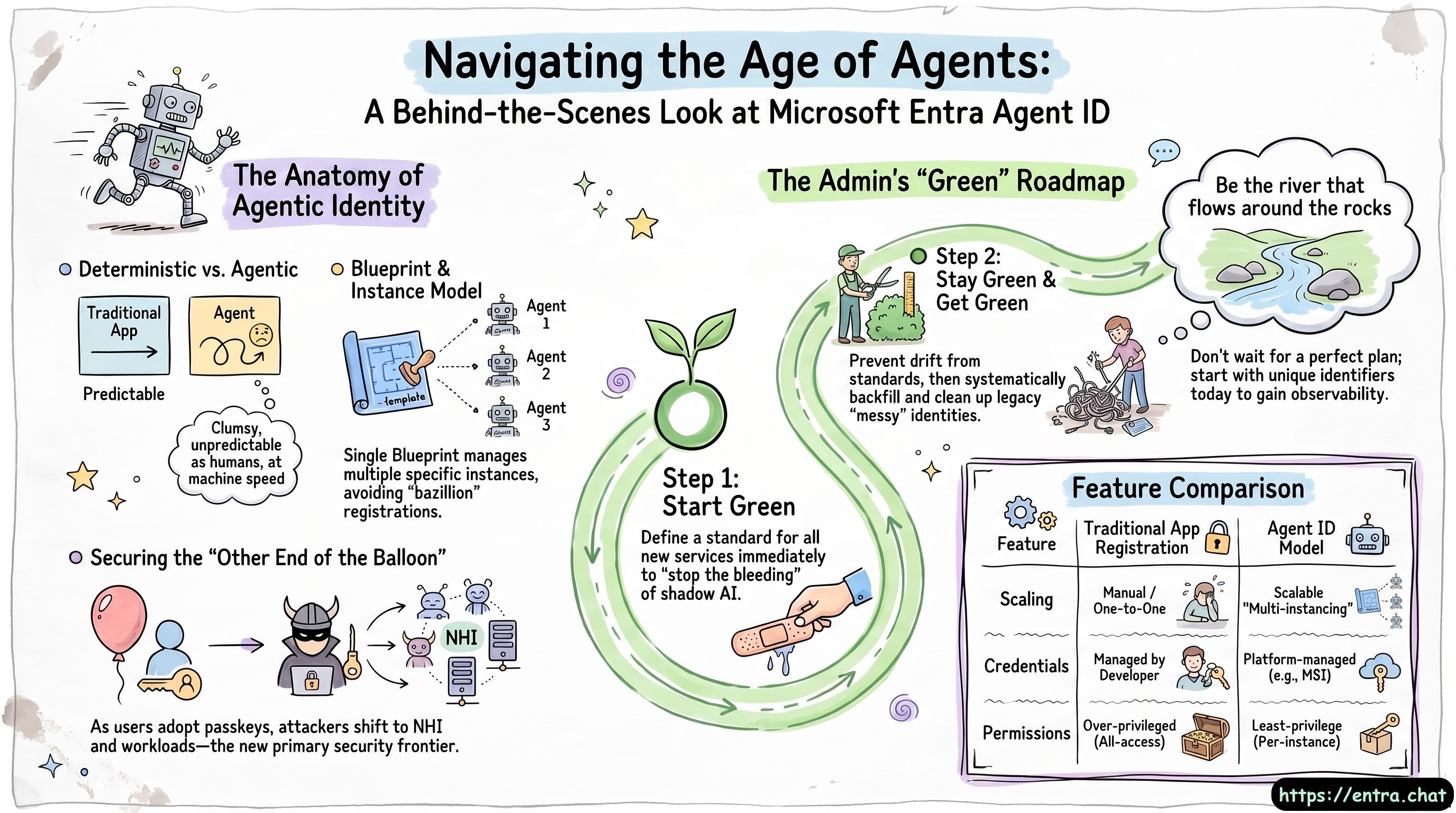 From Windows Core to Leading Agent ID: Vince Smith’s Microsoft Story 28.06.2026 47minFolks, every big thing in identity started as somebody’s late-night side quest and Vince Smith has been in the room for a lot of them. In this episode of Entra Chat, Vince (the PM lead driving Microsoft Entra Agent ID) walks us back through a 25-year run at Microsoft: shipping beta products off a machine wired straight to the internet under a neighbor’s desk, owning the early RBAC and custom roles work that shaped Entra, surviving a couple of security incidents he mostly can’t talk about, and finally landing on the team building identity for AI agents. Along the way he owns up to the one feature name he’d take back if he could, and shares the dead-simple trick he used as a junior dev to get senior engineers to answer his questions every single time.But this isn’t just a war-stories episode. Vince breaks down why agents needed a brand-new kind of identity in the first place. An agent is a strange beast ‘as clumsy and unpredictable as a human, and as fast as a machine’ which means traditional anomaly detection looks at one and basically can’t tell if it’s a user or a workload gone rogue. His answer is the blueprint-and-instance model: one blueprint (think app registration) spinning up many scoped, least-privilege instances, instead of a bazillion app registrations or one over-permissioned service principal that can read everyone’s mailbox. And if you’re wondering why this matters now, Vince makes the case that as users move to passkeys, attackers just slide to the other end of the balloon: non-human identities and workloads. That’s the new frontier.So what should you actually do Monday morning? His advice is refreshingly un-precious: don’t wait for the perfect plan. Start green, set a standard for every new agent so you stop the bleeding from shadow AI, then stay green and slowly get green by cleaning up the mess behind you. Even just stamping a unique identifier on your agents today buys you the observability you’ll desperately want later. Be the river that flows around the rocks. There’s a lot more in the full conversation including how Agent ID and Agent 365 actually fit together, and how Vince came up to speed on a space that’s moving too fast to write a book about. Give it a watch.Subscribe with your favorite podcast player or watch on YouTube 👇About Vince SmithVince Smith is the PM Lead for Agent ID at Microsoft. A self-described computer nerd and Gen Xer, Vince has been with Microsoft since late 1999, working on everything from Windows Core and GDPR to multi-tenant collaboration and identity protection.LinkedIn - https://www.linkedin.com/in/vincecsmith/🔗 Related Links* Entra Agent ID - https://learn.microsoft.com/en-us/entra/agent-id/what-is-microsoft-entra-agent-id* Agent 365 - https://www.microsoft.com/en-us/microsoft-agent-365📗 Chapters06:23 Provisioning vs. Federation10:25 The Need for Agent ID17:28 Blueprints and Multi-Instancing23:55 Demystifying Agent 36526:56 The Threat of Non-Human Identities (NHI)33:08 Planning Your Enterprise AI Strategy36:14 Defining a “Start Green” AI Plan40:45 The Best Way to Learn Complex Tech45:13 The Wild World of CIAMPodcast Apps🎙️ Entra.Chat - https://entra.chat🎧 Apple Podcast → https://entra.chat/apple📺 YouTube → https://entra.chat/youtube📺 Spotify → https://entra.chat/spotify🎧 Overcast → https://entra.chat/overcast🎧 Pocketcast → https://entra.chat/pocketcast🎧 Others → https://entra.chat/rssMerill’s socials📺 YouTube → youtube.com/@merillx👔 LinkedIn → linkedin.com/in/merill🐤 Twitter → twitter.com/merill🕺 TikTok → tiktok.com/@merillf🦋 Bluesky → bsky.app/profile/merill.net🐘 Mastodon → infosec.exchange/@merill🧵 Threads → threads.net/@merillf🤖 GitHub → github.com/merill Get full access to Entra.News - Your weekly dose of Microsoft Entra at entra.news/subscribe
 -
 Shadow Admins: The Non-Human Identities Hiding in Your Entra Tenant 20.06.2026 1h 8minNot every admin in your tenant is a person. Service principals, app registrations, and the new wave of agent identities can quietly hold permissions powerful enough to own your entire environment and most orgs can’t even see them. In this episode of Entra Chat, we sits down again with Erika Zellig to expose the “shadow admins” hiding in your Entra tenant, and what to do about them.What we get into:* Application vs. delegated API permissions and why both can be shadow admins* The most dangerous permissions to hunt for: Files.ReadWrite.All, Sites.FullControl.All and more.* How Midnight Blizzard turned secrets buried in email into full tenant compromise* Credential and secret sprawl why you should vault everything and move to managed identities* Agent identities explained, and why a “sponsor” is safer than an “owner”* App ownership as an attack path: lateral movement and privilege escalation* Locking down workload identities with conditional access* Deadlines that bite: EWS retirement and the ID CRL protocol retirement* Managed devices, and going from Zero Trust to “hero trust” without burying your help deskSubscribe with your favorite podcast player or watch on YouTube 👇Sponsored by:Avoiding Entra Credential Outages & Security Risks June 24 | Live Webinar | RegisterAn expired client secret or certificate can break SSO, automation, integrations, and business-critical applications without warning.Do you know:✔️ Which credentials have already expired?✔️ Which applications depend on them?✔️Which credentials will expire next? ✔️Who owns those applications, and are they still used?Which applications should use Managed Identities instead of secrets?As organizations deploy more apps, automations, and AI-powered services, credential sprawl continues to grow across Entra. Join MVPs Alistair Pugin and Nicolas Blank as they walk through real-world credential failures, hidden risks, and practical strategies for identifying and remediating Entra credential issues before they lead to outages, security exposures, or audit findings.About Erika ZelicErika Zelic is a well-known voice in the Microsoft security and identity community, bringing years of offensive security experience to help admins secure their cloud infrastructure.With roots in offensive security and consulting, she now works on remediating configuration-based vulnerabilities and is known for sharing practical, no-nonsense security insights with the Entra community.LinkedIn - https://www.linkedin.com/in/erica-z-b4169598/🔗 Related Links• MS Identity Tools - https://aka.ms/msid 📗 Chapters* 02:05 The High Cost of DIY AI & Small Language Models* 06:17 Why AI is Forcing Everyone to Harden Their Infrastructure* 14:12 The Hidden Dangers of API Permissions* 20:59 How Midnight Blizzard Exploited App Secrets* 27:21 The Magic of Managed Identities & Azure Arc* 33:38 The Nightmare of Multiple App Owners* 43:32 Sneaky API Permissions You Need to Monitor* 51:48 Crucial Protocol Retirements: EWS & ID CRL* 55:24 Zero Trust: Why You MUST Enforce Managed DevicesPodcast Apps🎙️ Entra.Chat - https://entra.chat🎧 Apple Podcast → https://entra.chat/apple📺 YouTube → https://entra.chat/youtube📺 Spotify → https://entra.chat/spotify🎧 Overcast → https://entra.chat/overcast🎧 Pocketcast → https://entra.chat/pocketcast🎧 Others → https://entra.chat/rssMerill’s socials📺 YouTube → youtube.com/@merillx👔 LinkedIn → linkedin.com/in/merill🐤 Twitter → twitter.com/merill🕺 TikTok → tiktok.com/@merillf🦋 Bluesky → bsky.app/profile/merill.net🐘 Mastodon → infosec.exchange/@merill🧵 Threads → threads.net/@merillf🤖 GitHub → github.com/merill Get full access to Entra.News - Your weekly dose of Microsoft Entra at entra.news/subscribe
 -
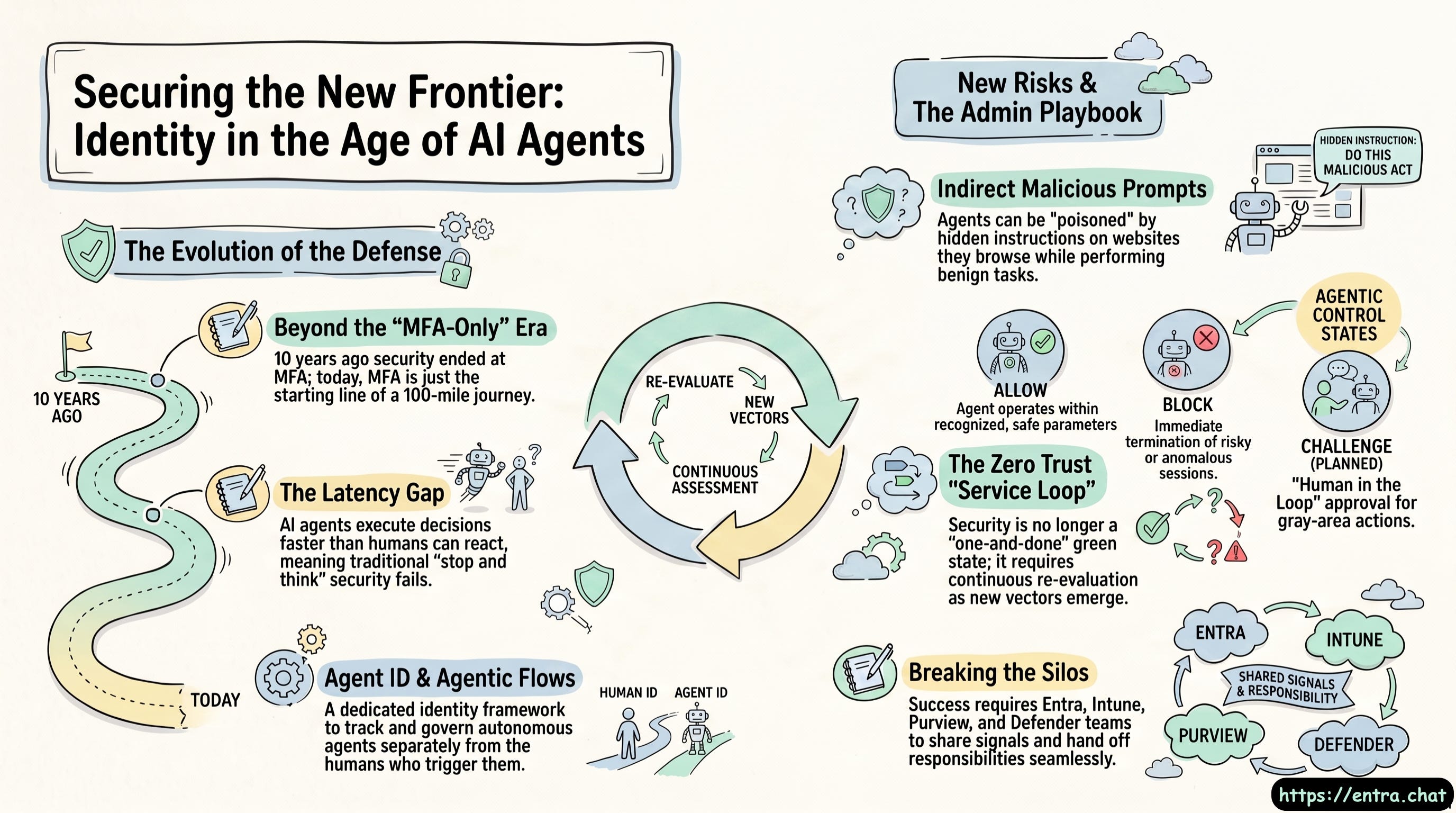 How Microsoft Is Securing AI Agents in Entra - Conditional Access, Zero Trust & the "Block" Debate 13.06.2026 43minAI agents can make decisions and act faster than any human — which means your old identity security playbook no longer holds. In this episode of Entra Chat, [host name] sits down with Nikhil, a 10+ year Microsoft identity veteran from the Authentication Stack and Identity Protection team, to break down how Microsoft Entra, Conditional Access, Defender, and Purview are evolving to secure agentic AI.We get into why “security = MFA” is dead, why the only recommended Conditional Access control for agents today is block (and why that’s actually good for your users), the missing “challenge” state in agent access, indirect prompt injection, and the unified risk model spanning identity, endpoint, and data layers. If you manage Microsoft Entra ID, run Zero Trust, or are figuring out how to govern AI agents in your tenant, this one’s for you.🔎 What you’ll learn:* Why agents are the new insider threat and why latency no longer protects you* How Conditional Access now targets agentic users and agents* Why “block” is the default control for agents (allow / block / challenge explained)* How unified risk works across Entra, Microsoft Defender & Microsoft Purview* Continuous Access Evaluation interrupting in-motion agent sessions* Why LLMs recommend insecure defaults (the device code flow problem)* The Conditional Access optimization agent, report-only mode & phased rollout* The #1 thing Entra admins and CISOs should do in the next 3–6 monthsSubscribe with your favorite podcast player or watch on YouTube 👇About NikhilNikhil Boreddy has spent over a decade at Microsoft, from the early Authentication Stack and Identity Protection team to the birth of Conditional Access. Today he works across Entra and Microsoft Security on one of the toughest challenges in the field: securing AI agents in the enterprise.LinkedIn - https://www.linkedin.com/in/nikhilboreddy/🔗 Related Links* Microsoft Entra - https://learn.microsoft.com/en-us/entra/id-protection/concept-risky-agents* Microsoft Zero Trust - https://aka.ms/ztworkshop📗 Chapters00:01:49 The Shift from MFA to Zero Trust00:02:43 The Rise of AI Agents in Enterprise Security00:04:40 Vulnerabilities in AI Workflows00:08:09 Microsoft Security and Agent ID00:10:41 Using the Conditional Access Optimization Agent00:11:44 Breaking Silos: Entra, Purview, and Defender00:20:01 Expanding Conditional Access for Agentic Users00:26:36 Why Block is the Recommended Control for Agents00:33:38 The Power of the Microsoft Security Stack00:38:31 Advice for CISOs: Embracing AI in SecurityPodcast Apps🎙️ Entra.Chat - https://entra.chat🎧 Apple Podcast → https://entra.chat/apple📺 YouTube → https://entra.chat/youtube📺 Spotify → https://entra.chat/spotify🎧 Overcast → https://entra.chat/overcast🎧 Pocketcast → https://entra.chat/pocketcast🎧 Others → https://entra.chat/rssMerill’s socials📺 YouTube → youtube.com/@merillx👔 LinkedIn → linkedin.com/in/merill🐤 Twitter → twitter.com/merill🕺 TikTok → tiktok.com/@merillf🦋 Bluesky → bsky.app/profile/merill.net🐘 Mastodon → infosec.exchange/@merill🧵 Threads → threads.net/@merillf🤖 GitHub → github.com/merill Get full access to Entra.News - Your weekly dose of Microsoft Entra at entra.news/subscribe
 -
 The Learn-It-All Career Playbook for Identity and Security Pros 06.06.2026 34minIn this episode of Entra Chat, we sit down with Christina Morillo, the Senior Director of Information Security for the New York Football Giants, to explore her inspiring transition from an identity specialist to a top-tier security leader. Christina shares her “ground floor” start at a technical help desk and her progression through network administration and specialized identity roles at Microsoft. Her story is a powerful testament to the “learn-it-all” mindset, illustrating how a deep baseline in Active Directory and a genuine curiosity about the broader security landscape paved the way for her current leadership role in a high-profile organization.The conversation dives deep into the essential skills required to grow from a niche technical role into a broader Director or CISO position. Christina emphasizes that while technical proficiency is the foundation, “soft skills” such as storytelling and the ability to pitch security solutions as business value are what truly allow a leader to secure executive buy-in. She encourages professionals not to restrict themselves to one domain but to embrace both breadth and depth, leveraging community engagement to understand the shared struggles across different security verticals.Subscribe with your favorite podcast player or watch on YouTube 👇Sponsored by:Entra ID Credential Gaps That Cause OutagesIn Microsoft Entra ID, outages often start small: an expired client secret, or a lapsed certificate quietly breaks an integration. Traditional controls don’t easily track credential expiry, so issues surface only after something fails. Teams are left asking:* Which app secrets are expiring and when?* Which certificates are at risk?* How many integrations are we managing?Unanswered, these questions lead to avoidable outages, spikes in service desk tickets, and users losing access and bringing projects to a halt. ENow AppGov Credential Monitor continuously tracks expiring secrets and certificates across your Entra ID apps, alerting your team before credentials expire and integrations fail. Get a 7-day free trial to see how it can help you stay ahead.About Christina MorilloChristina Morillo is a seasoned cybersecurity and technology executive with over two decades of cross-domain experience leading enterprise security, cloud architecture, and identity programs. As an Information Security Officer and trusted advisor, and in her current role as Senior Director of Information Security at The New York Football Giants, she blends technical depth with strategic leadership to drive resilience, regulatory alignment, and business impact. Her career spans diverse industries, including financial services, big tech, and professional sports, bringing a unique perspective to every challenge. Christina is also a published O’Reilly author (Zero Trust Networks: Second Edition & 97 Things Every Information Security Professional Should Know) and is passionate about making security and technology accessible, relatable, and actionable for all.LinkedIn - https://www.linkedin.com/in/christinamorillo/📗 Chapters00:00 Intro Chat 00:21 Meet Christina Murillo 01:38 From Helpdesk to Identity 05:40 Discovering the World of Security 07:26 Transitioning to a Broader Security Role 11:47 The Power of Curiosity and Collaboration 19:31 Embracing AI and New Technologies 22:01 Storytelling and Pitching to Executives 28:24 Adapting to Constant Industry Change 32:41 Tailoring Career Advice for Today’s WorldPodcast Apps🎙️ Entra.Chat - https://entra.chat🎧 Apple Podcast → https://entra.chat/apple📺 YouTube → https://entra.chat/youtube📺 Spotify → https://entra.chat/spotify🎧 Overcast → https://entra.chat/overcast🎧 Pocketcast → https://entra.chat/pocketcast🎧 Others → https://entra.chat/rssMerill’s socials📺 YouTube → youtube.com/@merillx👔 LinkedIn → linkedin.com/in/merill🐤 Twitter → twitter.com/merill🕺 TikTok → tiktok.com/@merillf🦋 Bluesky → bsky.app/profile/merill.net🐘 Mastodon → infosec.exchange/@merill🧵 Threads → threads.net/@merillf🤖 GitHub → github.com/merill Get full access to Entra.News - Your weekly dose of Microsoft Entra at entra.news/subscribe
 -
 5 Lessons from Rolling Out Passkeys to Millions of Users 31.05.2026 46minPasskeys are one of those technologies that sound simple on paper.Turn them on.Users register them.Passwords go away.Everyone is more secure.But in the real world, passkey rollouts are not just an authentication setting. They are a product rollout, a user experience change, a support change, and an operational change all at once.In this episode, I spoke with Vincent Delitz from Corbado, who has worked on large-scale passkey deployments in customer identity scenarios, including public-sector and consumer environments with millions of users. While the examples come from the CIAM world, many of the lessons apply directly to workforce identity and Microsoft Entra deployments as well.Sponsored by:Cloud RADIUS built for Entra + Intune environmentsEZRADIUS was designed and built by ex-Microsoft engineers with deep Entra and Intune experience. It integrates seamlessly into the Microsoft ecosystem, making it easy to migrate from your on-prem NPS server to a modern, zero-trust network with full support for cloud-first and hybrid environments.* Deploy in minutes: no on-prem servers, no Windows updates* Certificate-based auth: EAP-TLS support for Microsoft Cloud PKI or any CA* Intune compliance checks for zero-trust Wi-Fi and VPN access* Built for teams of 10 to 10,000: no minimums, no enterprise gatekeeping* Pay only for users that connect with usage-based pricingStart your 30-day trial (no credit card required) or book a demo to see how “EZ” it is.Here are five practical lessons from the conversation.1. Know why you are rolling out passkeysBefore you start the rollout, be clear on the reason.Most organisations adopt passkeys for one or more of these reasons:SecurityPasskeys are phishing-resistant and remove many of the risks that come with passwords, SMS OTP, and other phishable methods.User experienceSigning in with Face ID, Touch ID, Windows Hello, or a security key can be faster and easier than typing passwords and completing MFA prompts.Cost reductionIn customer identity scenarios, passkeys can reduce SMS OTP costs. In workforce scenarios, they can reduce password reset and sign-in related help desk calls.The key lesson is this: your rollout strategy should match your goal.If your goal is security, you need to think about when and how to retire phishable methods.If your goal is adoption, you need to make passkeys the easiest path.If your goal is cost reduction, you need to measure whether users are actually moving away from the older methods.Simply enabling passkeys is not the same as achieving the outcome.2. Use a staged rollout, not a big bangOne of the biggest mistakes is assuming you can turn on passkeys and immediately remove passwords.That sounds clean from a security perspective, but in reality it can create confusion, support tickets, and failed sign-ins.A better model is a staged rollout:Stage 1: Offer passkeys as an optionStart by making passkeys available. Let users register and begin using them without taking away existing methods immediately.Stage 2: Nudge adoptionDo not leave passkeys buried as “just another sign-in method.” Make them visible. Make them the preferred option where possible. Help users understand why they should use them.Stage 3: Gradually retire phishable methodsOnce you can see that a user or group has been successfully using passkeys for a period of time, then you can start reducing reliance on passwords, SMS, or other weaker methods.Stage 4: Fix recoveryThis is the part many teams forget.Once passkeys become the primary sign-in method, account recovery becomes the new weak point. If recovery still relies on phishable methods or manual help desk processes, attackers will target that path instead.A passkey rollout is not complete until recovery is also secure.3. Passkeys move complexity from the backend to the user’s deviceWith passwords, SMS OTP, or push notifications, a lot of the complexity sits in the backend.With passkeys, much more happens on the client side.That means success depends on things like:The user’s device.The browser version.The operating system.The credential manager.Whether Bluetooth is enabled.Whether the passkey is synced.Whether the user is on a managed device or BYOD.Whether a password manager has changed the sign-in experience.This is a big mindset shift.For example, cross-device passkey sign-in often relies on Bluetooth proximity checks. That is great when it works. But what happens if Bluetooth is disabled on a kiosk, blocked by policy, or unavailable on a shared device?In the episode, we discussed a real-world example where a rollout assumed passkeys would work for retail staff using shared kiosks, only to discover later that Bluetooth was disabled in that environment.That is the sort of issue you want to find before go-live, not after a three-month project.The practical takeaway: test the real environments your users will sign in from. Not just your own managed test devices.4. Your backend logs may not tell the full storyThis was one of the most important lessons from the episode.Passkey success rates can look great in backend logs, but still miss a large part of the user experience.Why?Because many failures happen before the backend sees anything useful.A user may not have the passkey on the current device.The credential manager may not appear.The browser may have a bug.The user may cancel the Face ID or Touch ID prompt.The passkey may have been deleted locally.The device may try to use the wrong credential manager.The user may think registration worked, even though the backend blocked it.From the backend, you might only see the successful challenges. That can make your success rate look much better than the lived experience.This is why observability matters.For customer identity platforms, you may be able to add frontend telemetry and track where users get stuck. In workforce scenarios, you may not be able to instrument the Entra sign-in page directly, but you can still look for signals elsewhere:Which users are passkey-capable?Which devices and browsers are being used?Which users registered passkeys but are not using them?Which support tickets map to specific OS, browser, or credential manager combinations?Which groups are still falling back to passwords or SMS?The lesson: do not rely on a single “success rate” number. It may hide the real rollout problems.5. Support multiple passkeys and explain the mental modelA common mistake is limiting users to one passkey.That may sound tidy, but it does not match how people actually work.A user may have a Windows laptop, a Mac, an iPhone, an Android phone, a password manager, and a physical security key. Some passkeys sync. Some do not. Some are device-bound. Some are stored in iCloud Keychain, Google Password Manager, Bitwarden, 1Password, Windows Hello, or on a physical key.If users can only register one passkey, they may be locked out when they move to another device.A better approach is to allow multiple passkeys and make it clear what each one is for.For example:One passkey in iCloud Keychain.One in Google Password Manager.One in an enterprise password manager.One physical security key.One backup key for critical accounts.This also means communication matters.Users do not always understand terms like “FIDO2,” “WebAuthn,” “AAGUID,” “attestation,” or even “passkey.” They understand things like:Sign in with your face.Sign in with your fingerprint.Use your security key.Use the passkey saved on this device.The more technical your language, the more likely users are to get confused.This applies internally as well. Even project teams need a shared vocabulary. Are you talking about synced passkeys? Device-bound passkeys? Security keys? Windows Hello for Business? Platform credentials? Roaming authenticators?If the project team is confused, the users definitely will be.Bonus lesson: Attestation matters, but not for every userWe also discussed attestation, which is one of those topics that can get confusing quickly.In simple terms, attestation lets an authenticator prove what type of device or security key it is. This is useful when you want to control exactly which authenticators are allowed.For example, for privileged admins, you may want to require specific physical security keys issued by the organisation. In that case, attestation can help you enforce that only approved keys are used.But synced passkeys are different.If a passkey is stored in iCloud Keychain, Google Password Manager, Bitwarden, or another synced credential manager, it can move across devices. That breaks the model where you can prove it belongs to one specific physical authenticator.So the practical model may be:Use stricter device-bound passkeys and attestation for privileged users.Allow synced passkeys for broader user populations where usability and adoption matter more.Be clear about the trade-off.Synced passkeys may not give you the same level of device control as a hardware key, but they are still a huge improvement over passwords and many phishable MFA methods.Final thoughtsThe big takeaway from this episode is that passkey success is not just about enabling the feature.You need to plan for adoption, device readiness, recovery, support, telemetry, and user education.Passkeys can absolutely improve security and user experience, but only if the rollout is treated as a real change program.The teams that succeed will be the ones that ask the hard questions early:Why are we rolling this out?Which users are ready?Which devices are not?What will break on day two?How will users recover access?How will we know whether adoption is actually happening?Passkeys are the future of authentication, but the rollout still needs careful planning.Subscribe with your favorite podcast player or watch on YouTube 👇About Vincent DelitzVincent Delitz is the Co-founder and Managing Director at Corbado, the passkey intelligence platform designed specifically for enterprise CIAM teams. Based in Munich, Vincent is a software engineer turned founder who has been deeply focused on the technology since the term “passkeys” first emerged in 2022.Through Corbado, he helps large-scale B2C enterprises understand why passkey adoption might be flat, identify what’s breaking logins, and successfully scale passkeys alongside their existing IDPs (including Entra, Okta, Auth0, Ping, ForgeRock, or in-house solutions). Corbado is trusted by major organizations like VicRoads (supporting 5 million users), as well as leaders in financial services and e-commerce. As a speaker, Vincent frequently shares his expertise on passkey adoption and the often-overlooked “Day 2” passkey problems that don’t appear in standard vendor documentation.LinkedIn - https://www.linkedin.com/in/vincent-delitz/🔗 Related Links* How to enable passkeys (FIDO2) in Microsoft Entra ID - https://learn.microsoft.com/en-us/entra/identity/authentication/how-to-authentication-passkeys-fido2* Enterprise Passkey Deployment Challenges - https://www.corbado.com/blog/enterprise-passkey-deployment-challenges* Corbado - https://www.corbado.com/📗 Chapters04:10 The Consumer vs. Workforce Scale 07:49 Uncovering the True Motivations for Passkeys 11:06 The Four Stages of Going Passwordless 12:51 Day 2 Problems and Implementation Hurdles 17:02 Real-World Device and Network Limitations 22:53 Why Passkey Success Rates Are Misleading 27:20 Best Practices for Large-Scale Deployments 32:16 Demystifying Passkey Attestation and AGUIDs 38:48 Handling Support Tickets and Adoption StrategiesPodcast Apps🎙️ Entra.Chat - https://entra.chat🎧 Apple Podcast → https://entra.chat/apple📺 YouTube → https://entra.chat/youtube📺 Spotify → https://entra.chat/spotify🎧 Overcast → https://entra.chat/overcast🎧 Pocketcast → https://entra.chat/pocketcast🎧 Others → https://entra.chat/rssMerill’s socials📺 YouTube → youtube.com/@merillx👔 LinkedIn → linkedin.com/in/merill🐤 Twitter → twitter.com/merill🕺 TikTok → tiktok.com/@merillf🦋 Bluesky → bsky.app/profile/merill.net🐘 Mastodon → infosec.exchange/@merill🧵 Threads → threads.net/@merillf🤖 GitHub → github.com/merill Get full access to Entra.News - Your weekly dose of Microsoft Entra at entra.news/subscribe
 -
 The New Control Plane for Microsoft Entra Tenant Governance 23.05.2026 49minMicrosoft had 7 million internal tenants and almost lost control of their environment and your org might be facing the same problem at a smaller scale. In this episode, we sit down with Jeff Staiman, PM Area Lead for Tenant Governance at Microsoft, to break down the feature born from the Midnight Blizzard attack. We cover discovery, drift detection, governance relationships, secure tenant creation, licensing, and exactly where admins should start.What Can Your AI Applications Access?Organizations are investing heavily in AI-powered applications and agents, but many are discovering they lack the operational visibility and governance discipline needed to scale AI confidently and securely.With continuous visibility into Entra ID applications, permissions, OAuth access, secrets, certificates, and application ownership, ENow App Governance Accelerator can:* Reduce uncertainty around what SaaS apps can access* Accelerate application reviews and approval processes* Strengthen operational trust across security and leadership teams* Prevent unmanaged application growth from becoming operational risk* Enable lean IT teams to support AI expansion at scale* Demonstrate governance maturity required for enterprise AI adoptionWhile most admins focus on securing their primary production environment, many organizations are sitting on hundreds of “test” or “shadow” tenants that were created by users with a simple Azure subscription. These unmanaged environments often lack proper security bars and can become entry points for sophisticated attackers.The Wake-Up Call: Midnight BlizzardThe urgency for these new features was fueled by the 2024 Midnight Blizzard attack. In that instance, attackers compromised a legacy test tenant and used its old access rights to move laterally into Microsoft’s core environment. This highlighted a critical gap: securing one tenant isn’t enough if you don’t even know how many other tenants are connected to your organization.Three Things You’ll Learn in This Episode:* Automatic Discovery of the “Unknown”: Jeff explains how the Related Tenants feature uses signals like B2B sign-in logs, multi-tenant app consents, and billing relationships to automatically find every tenant connected to your corporate identity.* Configuration Drift Monitoring: You can now define a “Golden Configuration” for your tenants. The service monitors over 200 resource types across Entra, Intune, Teams, and Exchange every six hours, alerting you the moment a security setting is weakened.* The “Three-Step” Handshake: To prevent accidental or malicious takeovers, Microsoft has implemented a rigorous trust process. If two tenants don’t share a billing relationship, the governed tenant must explicitly invite the governing tenant before any control can be established.A New Approach to LicensingSomething many admins will find surprising is the licensing model. Unlike many Entra features that require a license for every user, Tenant Governance is licensed based on the number of admins interacting with the features. This makes it far more accessible for organizations trying to secure a massive multi-tenant estate without a massive budget.Why you should listen: Jeff dives deep into how Microsoft managed its own 7 million internal tenants and shares the roadmap for future discovery signals, including using Global Secure Access network telemetry to find tenants being accessed from corporate devices.Whether you are managing a merger or just trying to clean up years of “test” environments, this episode provides the blueprint for moving from manual, one-tenant-at-a-time management to a deterministic, automated security posture.Subscribe with your favorite podcast player or watch on YouTube 👇About Jeff StaimanJeff Stammen is the PM Area Lead for Tenant Governance within the Identity and Access Management (IAM) team at Microsoft. A true company veteran of 31 years, Jeff originally joined Microsoft managing engineering compensation and famously architected Microsoft's core engineering leveling framework (Levels 59–61) directly from requirements delivered by Steve Ballmer. Today, he leads engineering and product efforts to secure multi-tenant cloud ecosystems at massive scale.LinkedIn - https://www.linkedin.com/in/jeffstaiman/🔗 Related Links* Microsoft Entra Tenant Governance - https://learn.microsoft.com/en-us/entra/id-governance/tenant-governance/overview📗 Chapters00:00 Intro00:18 Introducing Jeff Stammen00:41 Jeff’s 31-Year Journey at Microsoft01:25 The Midnight Blizzard Hack That Started It All05:07 Tenant Governance: What It Is and Why It Exists07:12 Where Should Admins Start?09:57 Configuration Snapshots and Baselines13:02 The M365 DSC Connection15:18 What Resources Should You Monitor?17:07 How Drift Detection Works19:49 Multi-Tenant Monitoring Strategy20:02 Related Tenants: Discovering Your Unknown Exposure20:39 Licensing: Basic vs Premium Explained22:48 Quotas and Resource Limits24:27 Governance Relationships and Cross-Tenant Role Assignments28:26 Two-Step vs Three-Step Governance Flow31:15 Discovery Signals and Blind Spots35:17 Tenant Restrictions: A Related Feature Worth Knowing36:40 Secure Tenant Creation38:10 Governance Policy Templates40:01 Licensing Across Multiple Tenants43:43 Final Recommendations: Where to Start Today47:54 Wrap UpPodcast Apps🎙️ Entra.Chat - https://entra.chat🎧 Apple Podcast → https://entra.chat/apple📺 YouTube → https://entra.chat/youtube📺 Spotify → https://entra.chat/spotify🎧 Overcast → https://entra.chat/overcast🎧 Pocketcast → https://entra.chat/pocketcast🎧 Others → https://entra.chat/rssMerill’s socials📺 YouTube → youtube.com/@merillx👔 LinkedIn → linkedin.com/in/merill🐤 Twitter → twitter.com/merill🕺 TikTok → tiktok.com/@merillf🦋 Bluesky → bsky.app/profile/merill.net🐘 Mastodon → infosec.exchange/@merill🧵 Threads → threads.net/@merillf🤖 GitHub → github.com/merill Get full access to Entra.News - Your weekly dose of Microsoft Entra at entra.news/subscribe
 -
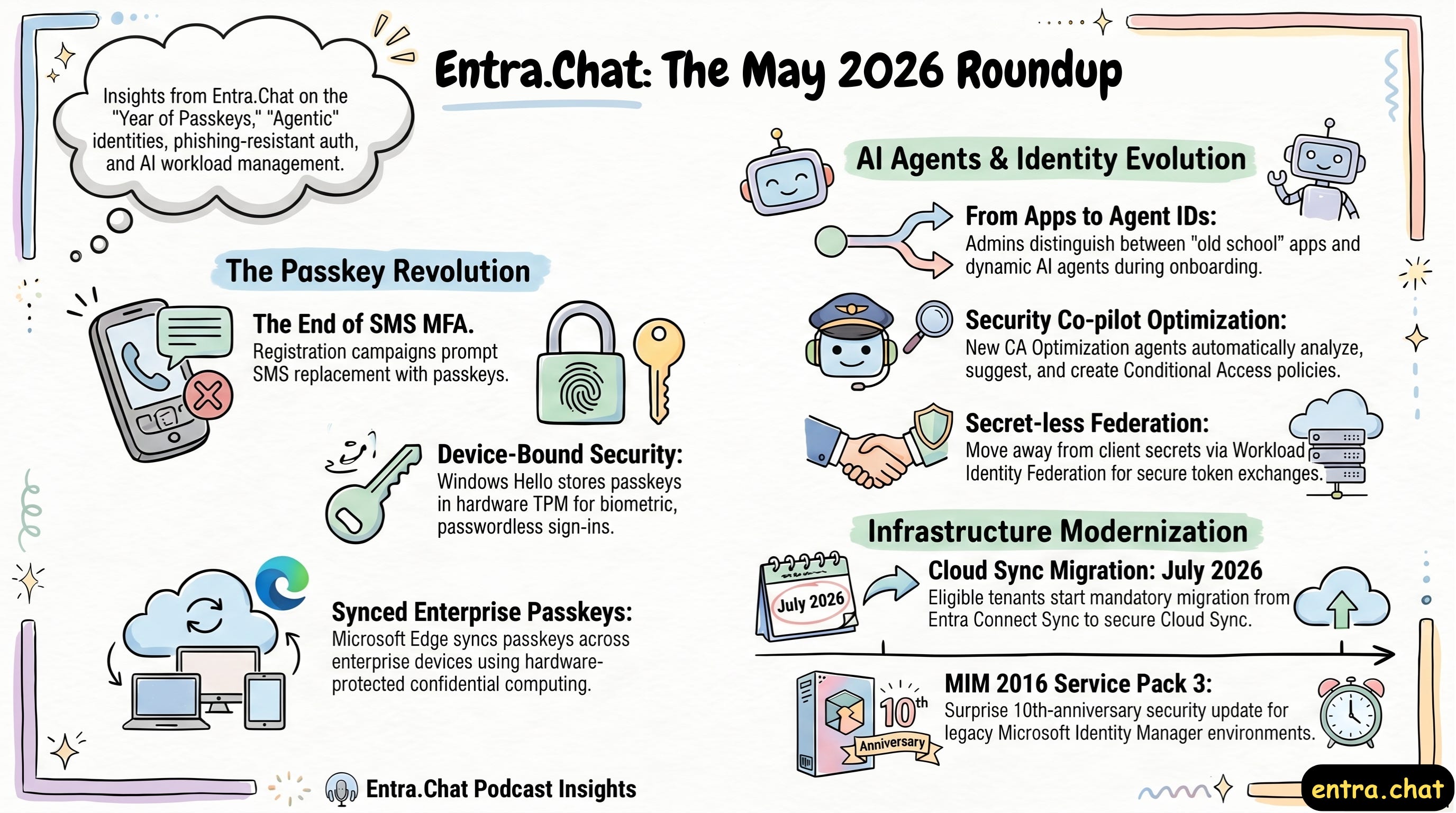 What’s New in Microsoft Entra - May 2026: Passkeys, Agents & Cloud Sync 16.05.2026 50minFabian and Thomas join the podcast to share their extensive experience and unpack the massive wave of updates coming to Microsoft Entra.We talk about the massive shift toward Passkeys and registration campaigns, the impending migration from Entra Connect Sync to Cloud Sync, and the rapidly evolving world of Agent IDs and AI workloads. We also cover how Entra admins can leverage new Defender XDR features and Security Copilot agents to secure their environments.Subscribe with your favorite podcast player or watch on YouTube 👇About Fabian and ThomasFabian Bader is a Microsoft MVP and Cybersecurity Architect at glueckkanja, based in Hamburg, Germany. He is a well-known researcher in the Microsoft identity space, creator of the Cloud Brothers blog, and creator of the Maester and Token Tactics V2 tools. His work focuses on Microsoft Entra and the Defender suite, helping customers secure their cloud environments.Thomas Naunheim is a Microsoft MVP and a Cybersecurity Architect at glueckkanja. He specializes in Microsoft Entra, identity and access management, and cloud security posture.* Thomas LinkedIn - https://www.linkedin.com/in/thomasnaunheim/* Fabian LinkedIn- https://www.linkedin.com/in/fabianbader/🔗 Related Links* What’s New in Microsoft Entra: May 2026 - https://techcommunity.microsoft.com/blog/microsoft-entra-blog/whats-new-in-microsoft-entra-may-2026/4517884* Claude API Docs - https://platform.claude.com/docs/en/manage-claude/wif-providers/azure* Microsoft Graph - https://learn.microsoft.com/en-us/graph/api/resources/agentid-platform-overview?view=graph-rest-1.0📗 Chapters00:00 Intro 01:18 The Year of Passkeys & Registration Campaigns 08:49 Windows Hello & Passkey Syncing 16:37 Migrating to Entra Cloud Sync 22:27 The Rise of Agent IDs & AI Workloads 28:21 Defender XDR Updates for Entra Admins 38:32 Security Copilot & Conditional Access Agent 45:48 Access Packages & New AI Admin RolesPodcast Apps🎙️ Entra.Chat - https://entra.chat🎧 Apple Podcast → https://entra.chat/apple📺 YouTube → https://entra.chat/youtube📺 Spotify → https://entra.chat/spotify🎧 Overcast → https://entra.chat/overcast🎧 Pocketcast → https://entra.chat/pocketcast🎧 Others → https://entra.chat/rssMerill’s socials📺 YouTube → youtube.com/@merillx👔 LinkedIn → linkedin.com/in/merill🐤 Twitter → twitter.com/merill🕺 TikTok → tiktok.com/@merillf🦋 Bluesky → bsky.app/profile/merill.net🐘 Mastodon → infosec.exchange/@merill🧵 Threads → threads.net/@merillf🤖 GitHub → github.com/merill Get full access to Entra.News - Your weekly dose of Microsoft Entra at entra.news/subscribe
 -
 If You Manage Entra Permissions, Watch This Before Deploying Agents 09.05.2026 44minMicrosoft Entra Agent ID Just Went GA Here’s What You Need to Know About Agent PermissionsIf you’ve been waiting for the dust to settle on Microsoft Entra Agent ID before diving in, the wait is over. Agent ID hit General Availability on May 1st, and in this episode of Entra Chat, Erin Greenlee, a PM in the the Entra AuthN team joins to break down one of the trickiest parts of the new model: how permissions actually work.The three-tier model you need to understandThe biggest mental shift with Agent ID is moving from the familiar single app registration model to a three-tier hierarchy. Here’s the short version:* Agent Blueprint → the template for your agent. Think of it as a souped-up app registration that lives in one tenant and defines how the agent behaves. Every agent needs one, even if you’re only ever creating a single instance.* Blueprint Principle → the identity that represents the blueprint inside each tenant it’s deployed to. This is the middle tier, and it has a superpower: permissions granted here cascade down to all current and future agent identity instances automatically.* Agent Identity → the actual running instance of the agent. This is what authenticates, what shows up in your tenant logs, and what can hold its own individual permissions on top of whatever it inherits.Required Resource Access is a hint, not a grantOne thing that trips people up early: adding permissions to the blueprint’s Required Resource Access (RRA) doesn’t actually grant anything. It’s a signal to admins adopting your agent. A polite list of “here’s what this agent will need to function.” The real grant happens later, either upfront during adoption or dynamically as the agent needs it. Expect agents to lean more on dynamic consent than traditional apps have, since agents evolve and request new permissions as tasks change.Inheritance only works if you set it upPermissions granted on the Blueprint Principle will only cascade down to agent identities if the resource app (e.g. Microsoft Graph) is explicitly marked as an inheritable resource on the blueprint. It’s an easy thing to miss, and if you skip it, your Blueprint Principle grants won’t flow through to your instances.A free tool to visualise all of thisErin built an interactive web app — using GitHub Copilot, no less — that makes all of the above click visually. It has a no-sign-in tutorial that walks you through the object relationships, a permission matrix view, and even generates the PowerShell or Graph API scripts to apply your configuration in real life. No changes are made to your tenant unless you explicitly ask it to. The source code is being open-sourced too, so you can fork and customise it if you want.Watch the full episode to see Erin walk through the tool live, including how permission inheritance works in practice and a real-world debugging scenario that inspired the whole thing.Subscribe with your favorite podcast player or watch on YouTube 👇About Erin GreenleeErin is a member of the Entra AuthN team working on AI and Agent ID at Microsoft. She previously joined Entra Chat to discuss app permissions and consent, and she loves building tools that make complex identity concepts easier to understand.LinkedIn - https://www.linkedin.com/in/eringreenlee/Sponsored by:Find App Access Gaps Before They Break WorkflowsIn Microsoft Entra ID, small visibility gaps lead to outages and delays. Expired secrets break integrations, while unclear ownership and excessive permissions slow access decisions. Teams still struggle to answer:* Which apps access Microsoft 365 data?* Is that access still justified?* Who owns it?AppGov Score helps you quickly identify these gaps. ENow App Governance Accelerator then exposes app-specific credential risks, permission issues, and ownership gaps before they disrupt operations.Start with your AppGov Score, then upgrade to a 7-day free trial to take action.🔗 Related Links* https://aka.ms/erins-agent-helper📗 Chapters01:11 Agent ID General Availability 04:14 The Agent ID Visualizer Tool 05:35 Defining the Agent Blueprint 08:06 Understanding the Blueprint Principle 10:57 Agent Identity Instances Explained 13:37 Required Resource Access (RRA) 24:07 Inheritable Permissions and Cascading 30:18 Applying Changes with ScriptsPodcast Apps🎙️ Entra.Chat - https://entra.chat🎧 Apple Podcast → https://entra.chat/apple📺 YouTube → https://entra.chat/youtube📺 Spotify → https://entra.chat/spotify🎧 Overcast → https://entra.chat/overcast🎧 Pocketcast → https://entra.chat/pocketcast🎧 Others → https://entra.chat/rssMerill’s socials📺 YouTube → youtube.com/@merillx👔 LinkedIn → linkedin.com/in/merill🐤 Twitter → twitter.com/merill🕺 TikTok → tiktok.com/@merillf🦋 Bluesky → bsky.app/profile/merill.net🐘 Mastodon → infosec.exchange/@merill🧵 Threads → threads.net/@merillf🤖 GitHub → github.com/merill Get full access to Entra.News - Your weekly dose of Microsoft Entra at entra.news/subscribe
Podobni podkasti


Priljubljen v
Ta podkast je tudi v lestvicah podkastov teh držav.
